
Using php hubleto create app
Purpose
php hubleto create app generates the skeleton of a new app: manifest, loaders, a home page, a settings page, a calendar class and an app menu extendible. Then it offers to install the app.
php hubleto create app MyFirstAppcreate app is a synonym for php hubleto app create.
Syntax
php hubleto create app <appNamespace> [noPrompt]| Argument | Description |
|---|---|
appNamespace |
MyFirstApp (short) or Hubleto\App\Custom\MyFirstApp (full). |
noPrompt |
Any non-empty value: install the app without asking. |
Arguments.
Where the app is created depends on the third part of the namespace:
| Namespace | Folder |
|---|---|
Hubleto\App\Custom\MyFirstApp |
<project>/src/apps/MyFirstApp (folders are created) |
Hubleto\App\Community\MyFirstApp |
vendor/hubleto/erp/apps/MyFirstApp (for contributors) |
Hubleto\App\External\Acme\MyFirstApp |
folder configured in externalAppsRepositories for Acme |
Hubleto\App\Premium\... |
not implemented |
Target folders.
Output
Real output:
$ php hubleto create app MyFirstApp
Hubleto CLI agent (release [dev-main]).
App Hubleto\App\Custom\MyFirstApp created successfully.
Do you want to install the app now?:   -> yes
Hubleto\App\Custom\MyFirstApp installed successfully.

💡  TIPS:
💡  -> Add your first model.
💡  ->   php hubleto create model Hubleto\App\Custom\MyFirstApp MyFirstAppFirstModel
Generated files
src/apps/
└── MyFirstApp/
    ├── Controllers/
    │   ├── Home.php          # home page of the app
    │   └── Settings.php      # settings page of the app
    ├── Extendibles/
    │   └── AppMenu.php       # app menu items (commented out)
    ├── Views/
    │   ├── Home.twig
    │   └── Settings.twig
    ├── Calendar.php          # calendar skeleton (not registered)
    ├── Loader.php            # routes, settings tile, installApp(), generateDemoData()
    ├── Loader.tsx            # instructions and markers for React components
    └── manifest.yaml
The files are rendered from the templates in vendor/hubleto/erp/cli/Templates/app/.
manifest.yaml
namespace: Hubleto\App\Custom\MyFirstApp
appType: custom
monthlyPricePerUser: 0
sidebarGroup: custom
rootUrlSlug: myfirstapp
name: MyFirstApp
icon: fas fa-home
author:
  name: "Hubleto CLI Agent"
  nick: "hubleto.cli"
highlight: App generated by Hubleto CLI agent.
created: 2026-09-30 12:41:14
The rootUrlSlug is the app name converted with Helper::str2url(): MyFirstApp becomes myfirstapp.
Loader.php (shortened)
<?php

namespace Hubleto\App\Custom\MyFirstApp;

class Loader extends \Hubleto\Erp\App
{
  public function init(): void
  {
    parent::init();

    $this->router()->get([
      '/^myfirstapp\/?$/' => Controllers\Home::class,
      '/^settings\/myfirstapp\/?$/' => Controllers\Settings::class,
    ]);

    // DO NOT DELETE FOLLOWING LINE, OR `php hubleto` WILL NOT GENERATE CODE HERE
    //@hubleto-cli:routes

    $settingsApp = $this->appManager()->getApp(\Hubleto\App\Community\Settings\Loader::class);
    $settingsApp->addSetting($this, [
      'title' => 'MyFirstApp', // or $this->translate('MyFirstApp')
      'icon' => 'fas fa-table',
      'url' => 'settings/myfirstapp',
    ]);

    // Uncomment following if your app will provide own calendar.
    // $calendarManager = $this->getService(\Hubleto\App\Community\Calendar\Manager::class);
    // $calendarManager->addCalendar($this, 'MyFirstApp-calendar', Calendar::class);
  }

  public function installApp(int $round): void
  {
    if ($round == 1) {
      // DO NOT DELETE FOLLOWING LINE, OR `php hubleto` WILL NOT GENERATE CODE HERE
      //@hubleto-cli:upgrade-schema
    }
  }

  public function generateDemoData(): void
  {
    // Create any demo data to promote your app.
  }
}
Controllers/Home.php
<?php

namespace Hubleto\App\Custom\MyFirstApp\Controllers;

class Home extends \Hubleto\Erp\Controller
{
  public function getBreadcrumbs(): array
  {
    return array_merge(parent::getBreadcrumbs(), [
      [ 'url' => 'myfirstapp', 'content' => 'MyFirstApp' ],
    ]);
  }

  public function prepareView(): void
  {
    parent::prepareView();
    $this->viewParams['now'] = date('Y-m-d H:i:s');
    $this->setView('@Hubleto:App:Custom:MyFirstApp/Home.twig');
  }
}
Views/Home.twig (shortened)
<h1 class="app-main-title">MyFirstApp</h1>

<div class="alert alert-info">
  This app was generated by <code class="bg-gray-100 p-1 font-bold">php hubleto create app Hubleto\App\Custom\MyFirstApp</code> command on 2026-09-30 12:41:14.<br/>
  <br/>
  Go to `Hubleto\App\Custom\MyFirstApp/Views/Home.twig` to see the source code of this view.
</div>

{# DO NOT DELETE FOLLOWING LINE, OR `php hubleto` WILL NOT GENERATE CODE HERE #}
{# @hubleto-cli:buttons #}
Controllers/Settings.php and Views/Settings.twig
class Settings extends \Hubleto\Erp\Controller
{
  public function getBreadcrumbs(): array
  {
    return array_merge(parent::getBreadcrumbs(), [
      [ 'url' => 'myfirstapp', 'content' => 'MyFirstApp' ],
      [ 'url' => 'settings', 'content' => 'Settings' ],
    ]);
  }

  public function prepareView(): void
  {
    parent::prepareView();
    $this->setView('@Hubleto:App:Custom:MyFirstApp/Settings.twig');
  }
}
<h1 class="app-main-title">MyFirstApp > Settings</h1>
<div class="alert alert-info">Create your custom settings page here</div>Result
After create app (and installation), the app appears in the Custom group of the main sidebar and a MyFirstApp tile appears in Settings → All settings:
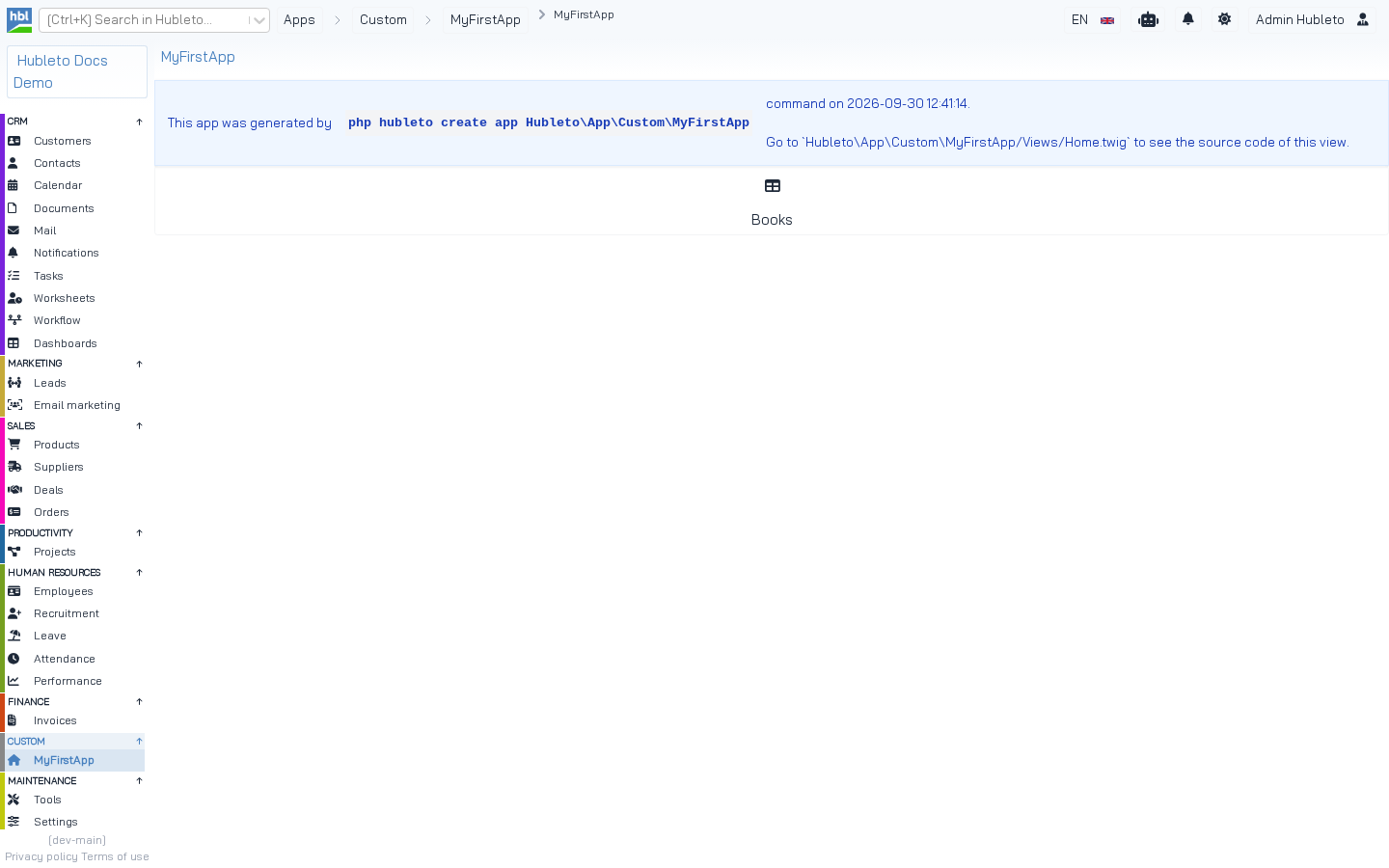 The home page of the generated app at `/myfirstapp`. The *Books* button was added later by `php hubleto create mvc`.
Next steps
- Add a model:
php hubleto create model MyFirstApp Book. - Add a table and a form:
php hubleto create mvc MyFirstApp Book. - Replace the generated texts with translated ones (
$this->translate(),{{ translate() }}), see Translations. - Choose a proper
iconandsidebarGroupinmanifest.yaml. - If the app has its own events, uncomment and implement the calendar (Calendar integration).