
Integration with Calendar app using custom Calendar.php class and $calendarManager->addCalendar()
The Calendar app shows events from many sources: its own simple events, deal activities, lead activities, tasks, approved leaves, recruitment interviews and more. Each source is a calendar provided by one app.
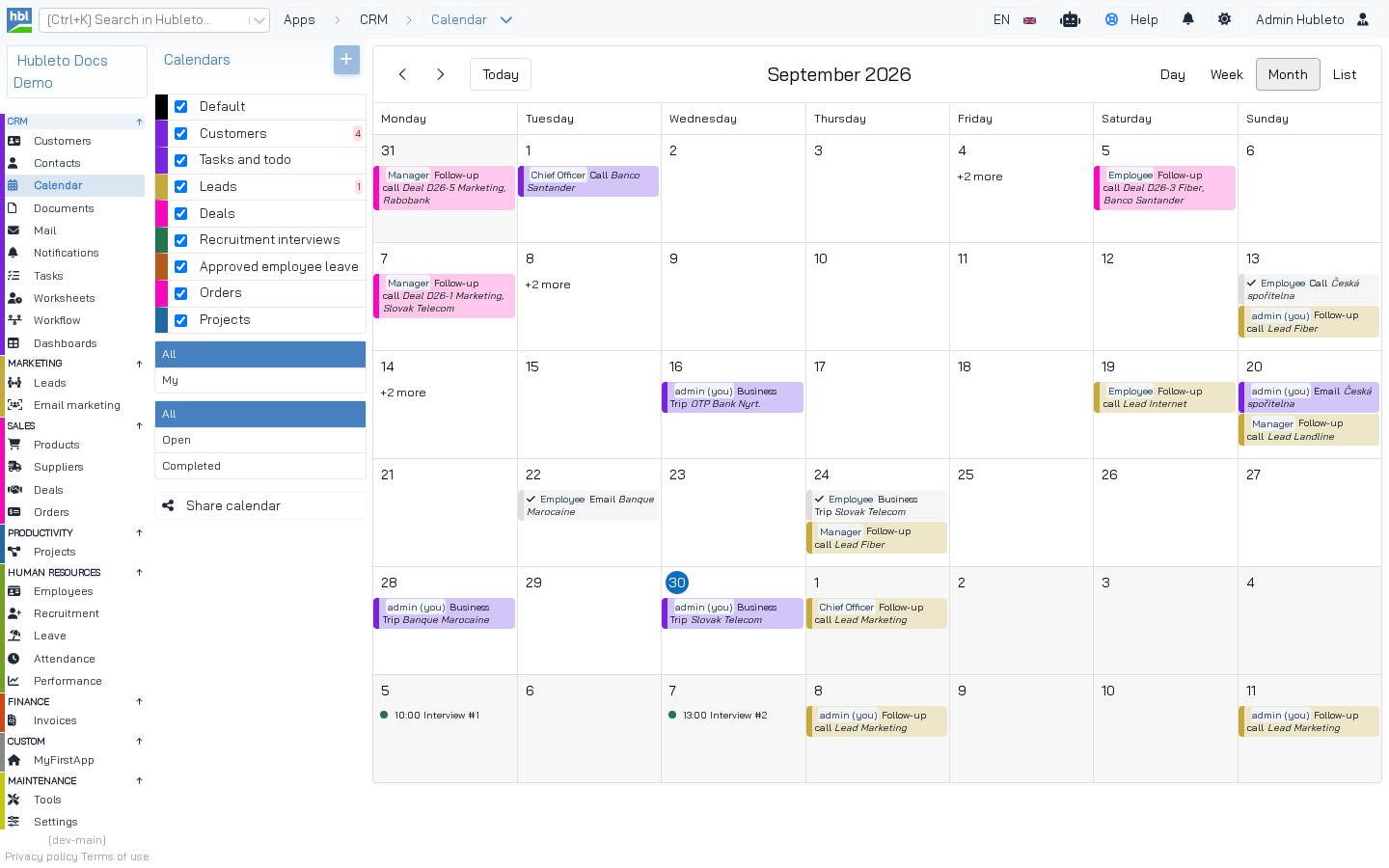 The Calendar app. The list on the left shows the calendars registered by the apps (Customers, Leads, Deals, Recruitment interviews, Approved employee leave, Orders, Projects, ...). Each has its own color.
To add your app's calendar:
- Create
Calendar.phpin the app's root folder, extendingHubleto\App\Community\Calendar\Calendar. - Implement
getCalendarConfig(),loadEvents()andloadEvent(). - Register it in
Loader::init()with$calendarManager->addCalendar(). - Optionally, register a React form for creating events of your calendar.
1. Calendar.php
apps/Deals/Calendar.php (simplified)
<?php

namespace Hubleto\App\Community\Deals;

class Calendar extends \Hubleto\App\Community\Calendar\Calendar
{
  public function getCalendarConfig(): array
  {
    return [
      'position' => 5,
      'color' => '#f50ab9',
      'title' => $this->translate('Deals'),
      'addNewActivityButtonText' => $this->translate('Add new activity linked to deal'),
      'icon' => 'fas fa-handshake',
      'formComponent' => 'DealCalendarActivityForm',
    ];
  }

  public function loadEvent(int $id): array
  {
    return $this->prepareLoadActivityQuery($this->getModel(Models\DealActivity::class), $id)->first()?->toArray();
  }

  public function loadEvents(string $dateStart, string $dateEnd, array $filter = []): array
  {
    $idDeal = $this->router()->urlParamAsInteger('idDeal');
    $mDealActivity = $this->getModel(Models\DealActivity::class);

    $activities = $this->prepareLoadActivitiesQuery($mDealActivity, $dateStart, $dateEnd, $filter)->with('DEAL.CUSTOMER');
    if ($idDeal > 0) {
      $activities = $activities->where("id_deal", $idDeal);
    }

    return $this->convertActivitiesToEvents(
      'deals',
      $activities->get()?->toArray(),
      function (array $activity) {
        if (!isset($activity['DEAL'])) {
          return '';
        }

        $deal = $activity['DEAL'];
        $customer = $deal['CUSTOMER'] ?? [];
        return 'Deal ' . $deal['identifier'] . ' ' . $deal['title'] . (isset($customer['name']) ? ', ' . $customer['name'] : '');
      }
    );
  }
}
Calendar config
| Key | Description |
|---|---|
title |
Name of the calendar in the list of calendars. |
color |
Default color of events. Users can change it (app config calendarColor). |
position |
Order in the list of calendars. |
icon |
FontAwesome icon. |
addNewActivityButtonText |
Text of the button that creates a new event in this calendar. |
formComponent |
Name of the registered React component used to create and edit events. |
Calendar configuration.
Methods
| Method | Returns | Description |
|---|---|---|
getCalendarConfig(): array |
config | See above. |
loadEvents(string $dateStart, string $dateEnd, array $filter = []): array |
list of events | Events in the date range. $filter contains fOwnership, fCompleted. |
loadEvent(int $id): array |
one event | One event for the edit form. |
Calendar methods.
Helpers inherited from Hubleto\App\Community\Calendar\Calendar
If your events are stored in an activity model (a model extending Hubleto\App\Community\Calendar\Models\Activity, like DealActivity), use the helpers. They handle date ranges, recurring events, completed events, ownership filters and conversion to the calendar format:
| Helper | Description |
|---|---|
prepareLoadActivityQuery(Activity $mActivity, int $id) |
Query for one activity. |
prepareLoadActivitiesQuery(Activity $mActivity, $dateStart, $dateEnd, $filter) |
Query for activities in the date range, including recurring ones. |
convertActivitiesToEvents(string $source, array $activities, \Closure $detailsCallback) |
Converts activities to events. The callback returns the details text of each event. |
Helpers of the base calendar.
An activity model: apps/Deals/Models/DealActivity.php
class DealActivity extends \Hubleto\App\Community\Calendar\Models\Activity
{
  public string $table = 'deal_activities';
  public string $recordManagerClass = RecordManagers\DealActivity::class;

  public array $relations = [
    'DEAL' => [ self::BELONGS_TO, Deal::class, 'id_deal', 'id' ],
    'CONTACT' => [ self::BELONGS_TO, Contact::class, 'id_contact', 'id' ],
  ];

  public function describeColumns(): array
  {
    return array_merge(parent::describeColumns(), [
      'id_deal' => (new Lookup($this, $this->translate('Deal'), Deal::class))->setRequired(),
      'id_contact' => (new Lookup($this, $this->translate('Contact'), Contact::class)),
    ]);
  }
}
Events from any model
Your events don't have to be activities. Return an array of events in the FullCalendar format. The HrLeave app shows approved leave requests:
apps/HrLeave/Calendar.php
class Calendar extends \Hubleto\App\Community\Calendar\Calendar
{
  public function getCalendarConfig(): array
  {
    return [
      'position' => 6,
      'color' => '#b35c1e',
      'title' => $this->translate('Approved employee leave'),
      'icon' => 'fas fa-umbrella-beach',
    ];
  }

  public function loadEvents(string $dateStart, string $dateEnd, array $filter = []): array
  {
    $mRequest = $this->getModel(Models\LeaveRequest::class);
    $requests = $mRequest->record->prepareReadQuery()
      ->whereHas('WORKFLOW_STEP', fn($query) => $query->where('tag', 'hr-leave-approved'))
      ->where('hr_leave_requests.date_from', '<=', $dateEnd)
      ->where('hr_leave_requests.date_to', '>=', $dateStart);

    $events = [];
    foreach ($requests->get() as $request) {
      $events[] = [
        'id' => (int) $request->id,
        'start' => $request->date_from,
        'end' => date('Y-m-d', strtotime($request->date_to . ' +1 day')),
        'allDay' => true,
        'title' => $this->translate('Leave') . ' #' . $request->id,
        'color' => '#b35c1e',
        'source' => 'hr-leave',
        'id_owner' => $request->id_user,
        'url' => 'hr-leave/requests/' . $request->id,
      ];
    }

    return $events;
  }
}| Event key | Description |
|---|---|
id |
ID of the event (record). |
start, end |
Date (Y-m-d) or date and time (Y-m-d H:i). For all-day events longer than one day, end is the day after the last day. |
allDay |
All-day event. |
title |
Title. |
color |
Color. |
source |
Must equal the source name used in addCalendar(). |
details |
Extra text, e.g. the related deal and customer. |
id_owner, completed, url |
Optional. |
Keys of an event.
2. Registration in Loader.php
apps/Deals/Loader.php
/** @var \Hubleto\App\Community\Calendar\Manager $calendarManager */
$calendarManager = $this->getService(\Hubleto\App\Community\Calendar\Manager::class);
$calendarManager->addCalendar($this, 'deals', Calendar::class);| Argument | Description |
|---|---|
$app |
Your app ($this). |
$source |
Unique name of the calendar. Used in URLs (calendar?show=deals) and in events (source). |
$calendarClass |
Your calendar class. |
Arguments of addCalendar().
From Hubleto\App\Community\Calendar\Manager
public function addCalendar(\Hubleto\Framework\Interfaces\AppInterface $app, string $source, string $calendarClass): void
{
  $calendar = $this->getService($calendarClass);
  $calendarConfig = $calendar->getCalendarConfig();
  $calendar->setColor($app->configAsString('calendarColor', $calendarConfig['color'] ?? '#000000'));
  $calendar->setApp($app);
  if ($calendar instanceof \Hubleto\Erp\Calendar) {
    $this->calendars[$source] = $calendar;
  }
}
Other registrations in the community apps: addCalendar($this, 'leads', Calendar::class), 'orders', 'tasks', 'projects', 'customers', 'hr-leave', 'calendar' (the Calendar app's own events).
3. The event form (React)
formComponent names a React component that the Calendar app opens when the user creates or edits an event. Register it in Loader.tsx:
apps/Deals/Components/FC/DealCalendarActivityForm.tsx
import CalendarFormActivity from "@hubleto/apps/Calendar/Components/FC/CalendarFormActivity"

const DealCalendarActivityForm = (props: any) => {
  return <CalendarFormActivity
    id={props.id}
    calendarTab={props.calendarTab}
    customInputFields={['id_deal']}
    defaultValues={{...props.defaultValues, id_deal: props.idDeal}}
    model='Hubleto/App/Community/Deals/Models/DealActivity'
    onClose={props.onClose}
  ></CalendarFormActivity>
}

export default DealCalendarActivityForm;
apps/Deals/Loader.tsx
globalThis.hubleto.registerReactComponent('DealCalendarActivityForm', DealCalendarActivityForm);4. Linking to the calendar
The Calendar app accepts show=<source> to show only one calendar. Apps link to it from their second sidebar:
$this->secondSidebarButton('calendar?show=deals', 'fas fa-calendar-days', 'Calendar')How the Calendar app uses your class
Hubleto\App\Community\Calendar\Controllers\Api\GetCalendarEvents calls loadEvents() of every calendar for the visible date range, or loadEvent($id) of one calendar when an event is opened. It adds SOURCEFORM (your formComponent) to the event, so the right form is opened.
Calendar generated by the CLI
php hubleto create app creates a Calendar.php skeleton. The registration in Loader.php is commented out:
src/apps/MyFirstApp/Loader.php (generated)
// Uncomment following if your app will provide own calendar.
// /** @var \Hubleto\App\Community\Calendar\Manager $calendarManager */
// $calendarManager = $this->getService(\Hubleto\App\Community\Calendar\Manager::class);
// $calendarManager->addCalendar(
//   $this, // reference to this app
//   'MyFirstApp-calendar', // UID of your app's calendar. Will be referenced as "source" when fetching app's events.
//   Calendar::class // your app's Calendar class
// );