
Using php hubleto create mvc
Purpose
php hubleto create mvc generates everything needed to browse and edit the records of a model: a React table, a React form, a controller, a Twig view, a route, the component registration and a button on the app's home page.
php hubleto create mvc MyFirstApp BookThe command is implemented by Hubleto\Erp\Cli\Agent\Create\TableFormViewAndController.
Syntax
php hubleto create mvc <appNamespace> <model> [force] [noPrompt]| Argument | Description |
|---|---|
appNamespace |
The app, e.g. MyFirstApp. The app must be installed. |
model |
An existing model of the app, e.g. Book. |
force |
Any non-empty value: overwrite existing files. |
noPrompt |
Any non-empty value: reinstall the app without asking. |
Arguments.
Output
Real output:
$ php hubleto create mvc MyFirstApp Book
Hubleto CLI agent (release [dev-main]).
Code inserted into '/var/www/html/hubleto/src/apps/MyFirstApp/Loader.tsx' under '//@hubleto-cli:imports'.
Code inserted into '/var/www/html/hubleto/src/apps/MyFirstApp/Loader.tsx' under '//@hubleto-cli:register-components'.
Code inserted into '/var/www/html/hubleto/src/apps/MyFirstApp/Loader.php' under '//@hubleto-cli:routes'.
Code inserted into '/var/www/html/hubleto/src/apps/MyFirstApp/Views/Home.twig' under '{# @hubleto-cli:buttons #}'.

Table, form, view and controller for model 'Book' in 'Hubleto\App\Custom\MyFirstApp' created successfully.
Do you want to re-install the app?:   -> no

💡  TIPS:
💡  -> Install Hubleto's React UI framework.
💡  ->   npm install @hubleto/react-ui
💡  -> Compile Javascript and CSS into assets.
💡  ->   npm run build
Generated and modified files
src/apps/MyFirstApp/
├─ Components/
│  ├─ FormBook.tsx        # new: form (class component)
│  └─ TableBooks.tsx      # new: table (class component)
├─ Controllers/
│  └─ Books.php           # new: controller
├─ Views/
│  ├─ Books.twig          # new: view with the hblreact tag
│  └─ Home.twig           # modified: "Books" button added
├─ Loader.php             # modified: route added
└─ Loader.tsx             # modified: import and registration added
Names derived from the model Book:
| Item | Name |
|---|---|
| Controller and view | Books (plural) |
| Table component | TableBooks |
| Form component | FormBook |
| Registered component | MyFirstAppTableBooks |
| HTML tag | <hblreact-my-first-app-table-books> |
| URL | myfirstapp/books |
Derived names.
Code inserted into existing files
Loader.php
//@hubleto-cli:routes
$this->router()->get([ '/^myfirstapp\/books(\/(?<recordId>\d+))?\/?$/' => Controllers\Books::class ]);
Loader.tsx
//@hubleto-cli:imports
import TableBooks from './Components/TableBooks';

//@hubleto-cli:register-components
globalThis.hubleto.registerReactComponent('MyFirstAppTableBooks', TableBooks);
Views/Home.twig
{# @hubleto-cli:buttons #}
<a class='btn btn-large btn-square btn-transparent' href='myfirstapp/books'>
<span class='icon'><i class='fas fa-table'></i></span>
<span class='text'>Books</span>
</a>
Controllers/Books.php (shortened)
<?php

namespace Hubleto\App\Custom\MyFirstApp\Controllers;

class Books extends \Hubleto\Erp\Controller
{
  // Uncomment this if you want to make your controller publicly
  // available without need for authentication.
  // public bool $requiresAuthenticatedUser = false;

  public function prepareView(): void
  {
    parent::prepareView();

    $this->viewParams['now'] = date('Y-m-d H:i:s');
    $this->viewParams['randomNumber'] = rand(1, 1000);

    $this->setView('@Hubleto:App:Custom:MyFirstApp/Books.twig');
  }
}
Views/Books.twig
<h1 class="app-main-title">{{ translate('MyFirstApp') }} > {{ translate('Books') }}</h1>

<hblreact-my-first-app-table-books
  string:tag="table-books"
  int:record-id="{{ viewParams.recordId }}"
  string:view="{{ viewParams.view }}"
  json:filters='{{ viewParams.filters|json_encode }}'
></hblreact-my-first-app-table-books>
Components/TableBooks.tsx (shortened)
import React, { Component } from 'react'
import TableExtended, { TableExtendedProps, TableExtendedState } from '@hubleto/react-ui/components/cc/TableExtended';
import FormBook from './FormBook';

interface TableBooksProps extends TableExtendedProps { }
interface TableBooksState extends TableExtendedState { }

export default class TableBooks extends TableExtended<TableBooksProps, TableBooksState> {
  static defaultProps = {
    ...TableExtended.defaultProps,
    formUseModalSimple: true,
    model: 'Hubleto/App/Custom/MyFirstApp/Models/Book',
  }

  translationContext: string = 'Hubleto\\App\\Custom\\MyFirstApp';
  translationContextInner: string = 'Components\\TableBooks';

  getFormModalProps(): any {
    let params = super.getFormModalProps();
    params.type = 'right wide';
    return params;
  }

  setRecordFormUrl(id: number) {
    window.history.pushState({}, "", globalThis.hubleto.config.projectUrl + '/books//' + (id > 0 ? id : 'add'));
  }

  renderForm(): React.JSX.Element {
    let formProps = this.getFormProps();
    return <FormBook {...formProps}/>;
  }
}
Components/FormBook.tsx (shortened)
import FormExtended, { FormExtendedProps, FormExtendedState } from '@hubleto/react-ui/components/cc/FormExtended';

export default class FormBook<P, S> extends FormExtended<FormBookProps, FormBookState> {
  static defaultProps: any = {
    ...FormExtended.defaultProps,
    model: 'Hubleto/App/Custom/MyFirstApp/Models/Book'
  }

  translationContext: string = 'Hubleto\\App\\Custom\\MyFirstApp';
  translationContextInner: string = 'Components\\FormBook';

  getStateFromProps(props: FormBookProps) {
    return {
      ...super.getStateFromProps(props),
      tabs: [
        { uid: 'default', title: <b>{this.translate('Book')}</b> },
      ]
    };
  }

  getRecordFormUrl(): string {
    return 'books/' + (this.state.record.id > 0 ? this.state.record.id : 'add');
  }

  renderTitle(): React.JSX.Element {
    const R = this.state.record;
    return <>
      <small>{this.translate('Book')}</small>
      <h2>{R.id <= 0 ? this.translate('New') : R.id}</h2>
    </>;
  }
}
Build and open
The React components must be compiled before the page works:
npm run buildThen open https://your-hubleto/myfirstapp/books:
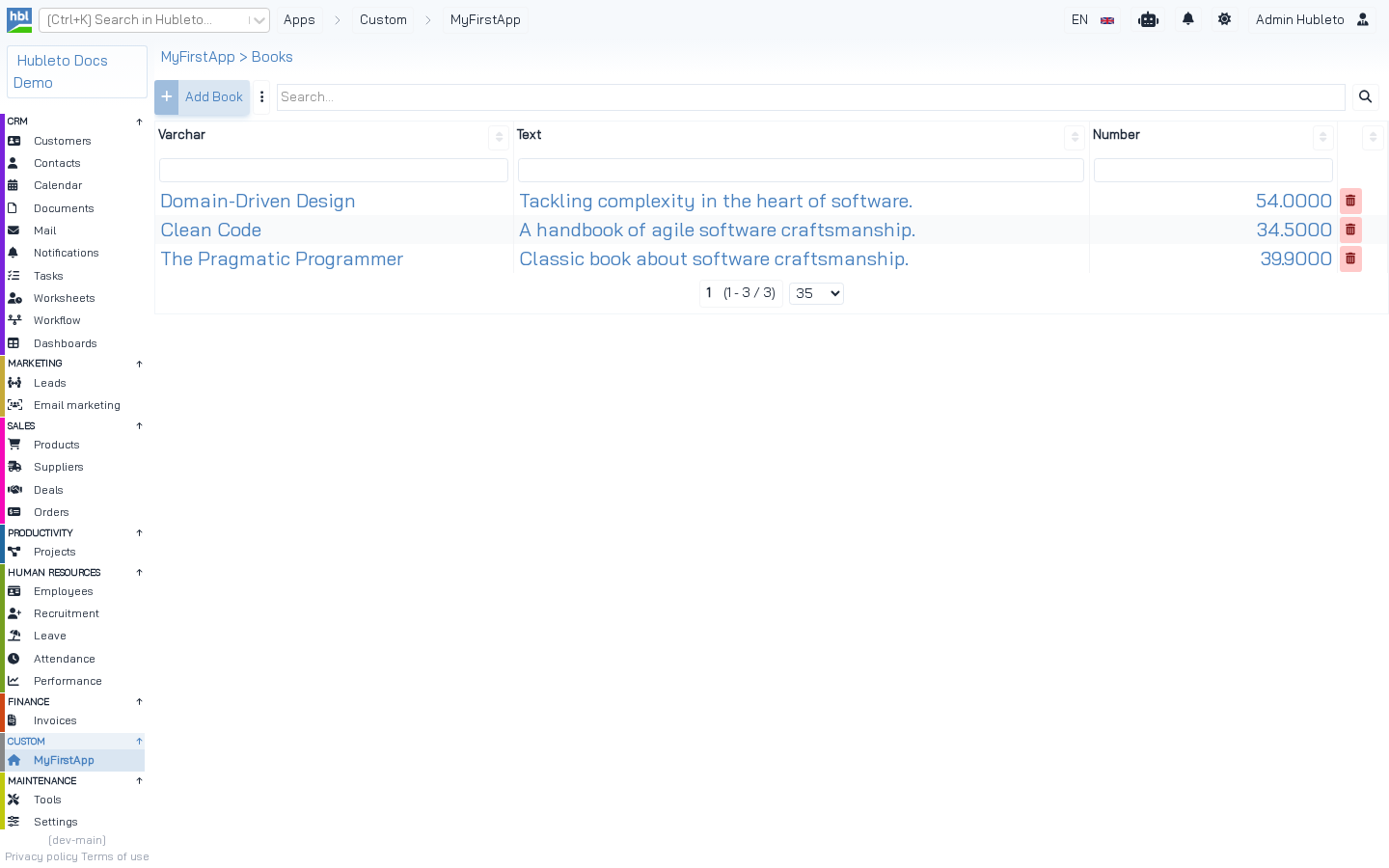 The generated table for the `Book` model. The columns *Varchar*, *Text* and *Number* come from the sample columns in `Models/Book.php`. The `books` table must exist, see [create model](create-model).
Recommended changes to the generated code
The templates use the older class components. The community apps use functional components (see React components). After generating, consider:
| Change | Why |
|---|---|
Fix the URLs in setRecordFormUrl() ('/books//') and getRecordFormUrl() ('books/') to myfirstapp/books/ |
The generated URLs miss the app's slug. After opening a record, the browser URL is wrong. |
Replace the route with $this->router()->crud('myfirstapp/books', Controllers\Books::class); |
Also supports myfirstapp/books/add. |
Rewrite TableBooks.tsx and FormBook.tsx as functional components in Components/FC/ |
Same style as the community apps. refactoring-guide.md in hubleto/react-ui has templates. |
Add string:fulltext-search, json:column-search and string:form-active-tab-uid to the view |
The table then keeps its search and the active tab in the URL, like the community apps. |
Remove the sample viewParams (now, randomNumber) from the controller |
Not used by the view. |
Translate the button text in Home.twig |
{{ translate('Books') }}. |
Recommended changes.
The same table as a functional component (Components/FC/TableBooks.tsx)
import React from 'react'
import Translator from '@hubleto/react-ui/core/Translator';
import Table from '@hubleto/react-ui/components/fc/Table';
import { TableMeta, TableProps } from '@hubleto/react-ui/components/fc/TableInterfaces';
import FormBook from './FormBook';

interface TableBooksProps extends TableProps {}

const componentName = 'TableBooks'; // must be the same as the exported const
const parentApp = 'Hubleto/App/Custom/MyFirstApp';
const T = new Translator(parentApp + '/Loader', 'Components/' + componentName);

const TableBooks = (props: TableBooksProps) => {
  return <Table
    componentName={componentName}
    parentApp={parentApp}
    model={parentApp + '/Models/Book'}
    baseUrlSlug='myfirstapp/books'
    formModalProps={{type: 'right wide'}}
    renderForm={(table: TableMeta): React.JSX.Element => {
      return <FormBook {...table.getDefaultFormProps()}/>;
    }}
    {...props}
  ></Table>
}

export default TableBooks;
The same form as a functional component (Components/FC/FormBook.tsx)
import React from 'react';
import Translator from '@hubleto/react-ui/core/Translator';
import { FormProps } from '@hubleto/react-ui/components/fc/FormInterfaces';
import Form from '@hubleto/react-ui/components/fc/Form';
import Input from '@hubleto/react-ui/components/fc/FormComponents/Input';

export interface FormBookProps extends FormProps {}

const componentName = 'FormBook'; // must be the same as the exported const
const parentApp = 'Hubleto/App/Custom/MyFirstApp';
const T = new Translator(parentApp + '/Loader', 'Components/' + componentName);

const TabDefault = (props: FormBookProps) => {
  return <>
    <Input field='varchar_example' />
    <Input field='text_example' />
    <Input field='decimal_example' />
  </>;
}

const FormBook = (props: FormBookProps) => {
  return <Form
    componentName={componentName}
    parentApp={parentApp}
    model={parentApp + '/Models/Book'}
    urlSlug='myfirstapp/books'
    title={{field: 'varchar_example', sub: T.translate('Book')}}
    tabs={{default: {content: () => <TabDefault {...props} />}}}
    {...props}
  ></Form>;
}

export default FormBook;
Update the import in Loader.tsx to ./Components/FC/TableBooks and rebuild.