
Integration with Workflow app using custom Workflow.php class and $workflowManager->addWorkflowGroup()
The Workflow app manages workflows (pipelines) and their steps. A deal moves through Prospecting → Qualified → Quote Sent → ... → WON / LOST. A leave request moves through Submitted → Manager review → HR review → Approved / Rejected. The Workflow app shows the records of each workflow on a kanban board.
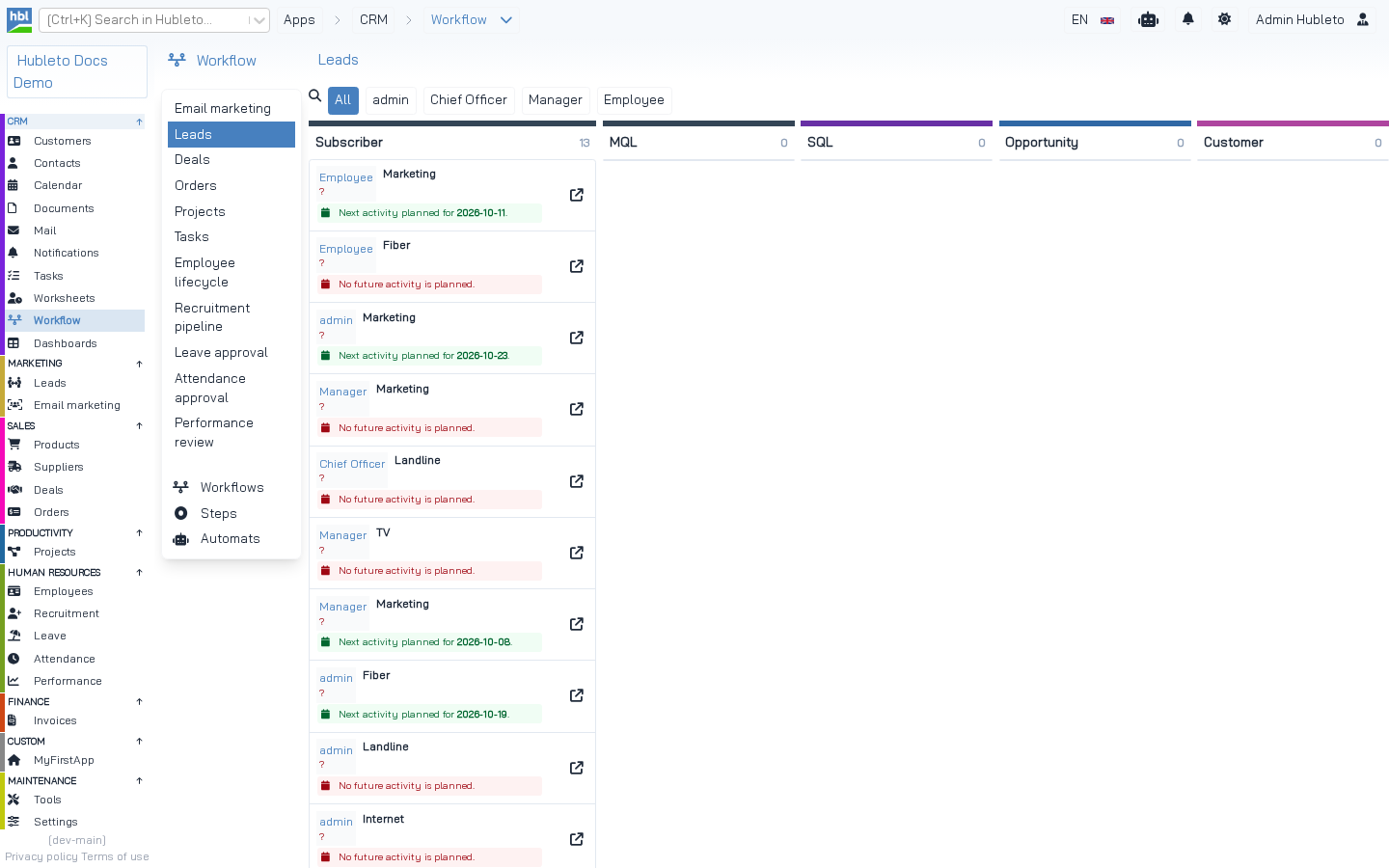 The kanban board of the Leads workflow. The cards are loaded by `Hubleto\App\Community\Leads\Workflow::loadItems()`.
Concepts
| Concept | Where | Description |
|---|---|---|
| Workflow | Workflow\Models\Workflow |
A named pipeline with a group, e.g. "Deals" in group deals. |
| Step | Workflow\Models\WorkflowStep |
A step with name, order, color and a unique tag, e.g. deal-won. |
| Group | workflows.group column |
Connects workflows to an app. One app can have more workflows in its group. |
| Workflow loader | your Workflow.php |
Loads the records of a workflow for the kanban. Registered for a group. |
| History | Workflow\Models\WorkflowHistory |
Every change of the step, saved by an event listener. |
| Automats | Workflow\Models\Automat |
Rules that run actions when records change. |
Workflow concepts.
The Workflow app creates default workflows for the community apps during its installation, e.g. group deals:
From apps/Workflow/Loader.php, installApp()
$idWorkflow = $mWorkflow->record->recordCreate([ "name" => $this->translate('Deals'), "show_in_kanban" => 1, "order" => 3, "group" => "deals" ])['id'];
$mWorkflowStep->record->recordCreate([ 'name' => $this->translate('Prospecting'), 'order' => 1, 'color' => '#838383', 'id_workflow' => $idWorkflow, "probability" => 1, 'tag' => 'deal-prospecting']);
$mWorkflowStep->record->recordCreate([ 'name' => $this->translate('Qualified'), 'order' => 2, 'color' => '#d8a082', 'id_workflow' => $idWorkflow, "probability" => 10, 'tag' => 'deal-qualified']);
// ...
$mWorkflowStep->record->recordCreate([ 'name' => $this->translate('WON'), 'order' => 7, 'color' => '#008000', 'id_workflow' => $idWorkflow, "set_result" => Deal::RESULT_WON, "probability" => 100, 'tag' => 'deal-won']);
$mWorkflowStep->record->recordCreate([ 'name' => $this->translate('LOST'), 'order' => 8, 'color' => '#f50c0c', 'id_workflow' => $idWorkflow, "set_result" => Deal::RESULT_LOST, "probability" => 0, 'tag' => 'deal-lost']);
Steps to integrate your app
- Add the columns
id_workflowandid_workflow_stepto your model. - Assign the default workflow of your group when a record is created.
- Create
Workflow.phpthat loads items for the kanban. - Register it with
$workflowManager->addWorkflowGroup(). - Create a workflow for your group (in
installApp()or in Settings → Workflows). - Optionally, add a step filter to the table and use step tags in counters.
1. Columns in the model
apps/HrLeave/Models/LeaveRequest.php (part)
use Hubleto\App\Community\Workflow\Models\Workflow as WorkflowModel;
use Hubleto\App\Community\Workflow\Models\WorkflowStep;

public array $relations = [
  // ...
  'WORKFLOW' => [ self::HAS_ONE, WorkflowModel::class, 'id', 'id_workflow' ],
  'WORKFLOW_STEP' => [ self::HAS_ONE, WorkflowStep::class, 'id', 'id_workflow_step' ],
];

public function describeColumns(): array
{
  return array_merge(parent::describeColumns(), [
    // ...
    'id_workflow' => (new Lookup($this, $this->translate('Workflow'), WorkflowModel::class))->setReadonly(),
    'id_workflow_step' => (new Lookup($this, $this->translate('Approval step'), WorkflowStep::class))->setDefaultVisible()->setReadonly(),
  ]);
}
With these two columns, three things happen automatically:
Form.tsxshows the workflow selector in the form header (it checks forinputs.id_workflowandinputs.id_workflow_step),- the
SaveWorkflowHistoryevent listener saves every step change, - workflow automats can react to changes of your records.
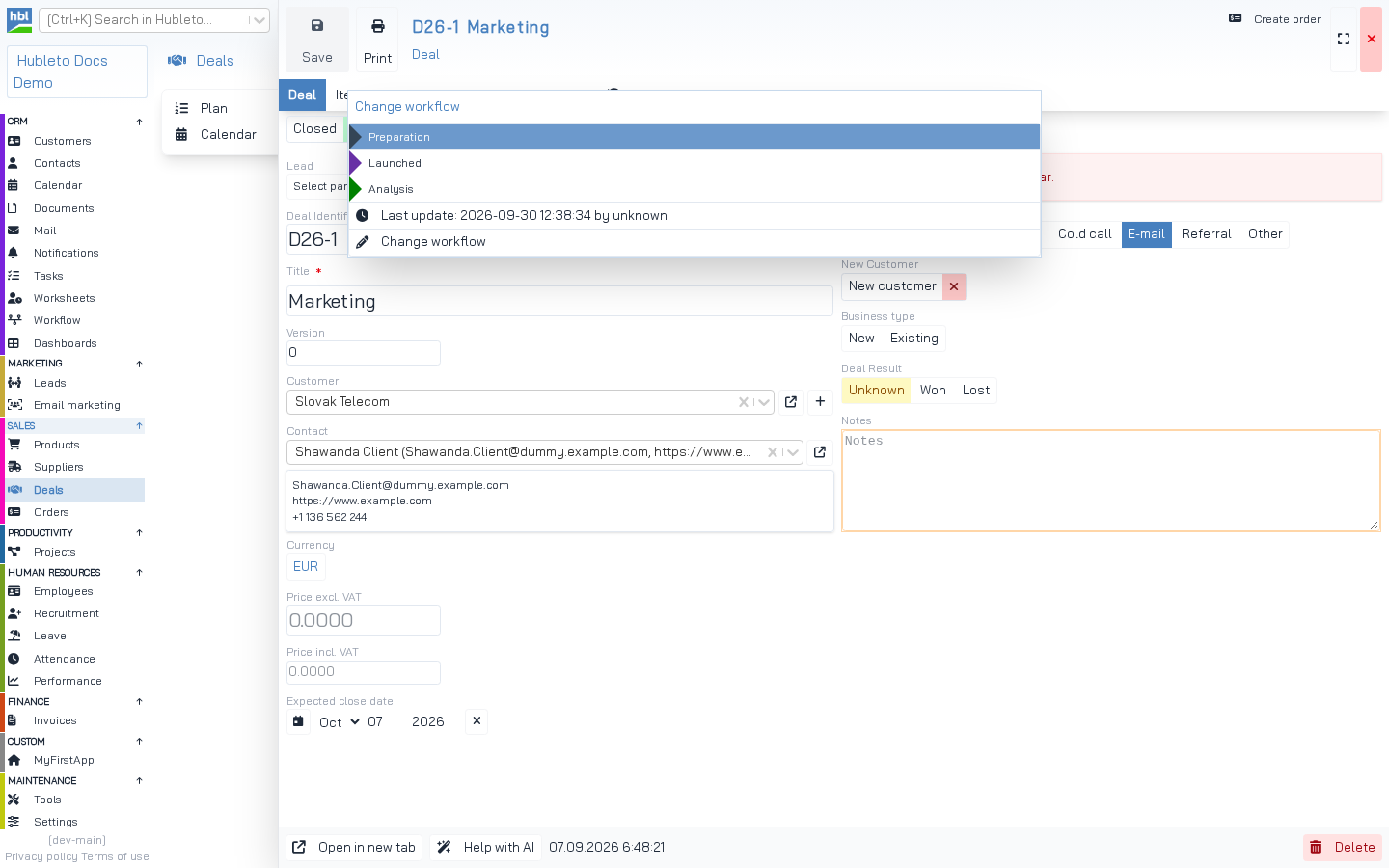 The workflow selector in the header of the deal form, opened. It lists the steps of the record's workflow and shows the last change from the workflow history.
2. Default workflow for new records
apps/HrLeave/Models/LeaveRequest.php
public function onAfterCreate(array $savedRecord): array
{
  $savedRecord = parent::onAfterCreate($savedRecord);

  /** @var WorkflowModel $mWorkflow */
  $mWorkflow = $this->getModel(WorkflowModel::class);
  $savedRecord = $mWorkflow->applyDefaultWorkflow($savedRecord, 'hr_leave');
  $this->record->recordUpdate($savedRecord);

  return $savedRecord;
}
applyDefaultWorkflow($record, $group) sets id_workflow to the first workflow of the group and id_workflow_step to its first step, but only if the record has no workflow yet. The same pattern is used by Orders ('orders'), Projects ('projects'), Tasks ('tasks'), Invoices ('invoices'), HrEmployees ('hr_employees') and others.
3. Workflow.php
The class extends Hubleto\App\Community\Workflow\Workflow and implements loadItems(). It returns the records of one workflow for the kanban board:
apps/Deals/Workflow.php
<?php

namespace Hubleto\App\Community\Deals;

class Workflow extends \Hubleto\App\Community\Workflow\Workflow
{
  public function loadItems(int $idWorkflow, array $filters): array
  {
    $fOwner = (int) ($filters['fOwner'] ?? 0);

    $mDeal = $this->getModel(Models\Deal::class);
    $items = $mDeal->record->prepareReadQuery()
      ->where($mDeal->table . ".id_workflow", $idWorkflow)
      ->where($mDeal->table . ".is_closed", false);

    if ($fOwner > 0) {
      $items = $items->where($mDeal->table . '.id_owner', $fOwner);
    }

    $items = $items->get()?->toArray();

    foreach ($items as $key => $item) {
      $items[$key]['_DETAIL_URL'] = 'deals/' . $item['id'];
      $items[$key]['_DETAIL_VIEW'] = '@Hubleto:App:Community:Deals/WorkflowItemDetail.twig';
    }

    return $items;
  }
}
Each item must contain id_workflow_step (the kanban column). Add these keys for the card:
| Key | Description |
|---|---|
_DETAIL_URL |
Link to the record. |
_DETAIL_VIEW |
Twig view that renders the card. |
_WORKFLOW_ITEM_TITLE |
Title for the generic card view @Hubleto:App:Community:Workflow/WorkflowItemDetail.twig. |
_WORKFLOW_ITEM_SUBTITLE |
Subtitle for the generic card view. |
Keys of a workflow item.
If you don't need a custom card, use the generic view:
apps/HrLeave/Workflow.php (part)
foreach ($items as $key => $item) {
  $user = $item['USER'] ?? [];
  $leaveType = $item['LEAVE_TYPE'] ?? [];

  $items[$key]['_WORKFLOW_ITEM_TITLE'] = trim(($user['nick'] ?? '') . ' - ' . ($leaveType['name'] ?? $this->translate('Leave')));
  $items[$key]['_WORKFLOW_ITEM_SUBTITLE'] = ($item['date_from'] ?? '') . ' - ' . ($item['date_to'] ?? '');
  $items[$key]['_DETAIL_URL'] = 'hr-leave/requests/' . $item['id'];
  $items[$key]['_DETAIL_VIEW'] = '@Hubleto:App:Community:Workflow/WorkflowItemDetail.twig';
}
A custom card view gets the item as item:
apps/Deals/Views/WorkflowItemDetail.twig (part)
<div class="flex flex-col p-2 text-sm font-normal">
  <div class="text-gray-400 text-nowrap">{{ item.CUSTOMER.name }}</div>
  <div class="font-bold">{{ item.identifier }} {{ item.title }}</div>
  {% if item.virt_next_activity_date == '' %}
    <div class="badge badge-danger text-xs">No future activity is planned.</div>
  {% endif %}
</div>
4. Registration in Loader.php
apps/Deals/Loader.php
/** @var \Hubleto\App\Community\Workflow\Manager $workflowManager */
$workflowManager = $this->getService(\Hubleto\App\Community\Workflow\Manager::class);
$workflowManager->addWorkflowGroup($this, 'deals', Workflow::class);| Argument | Description |
|---|---|
$app |
Your app ($this). |
$group |
Name of the group. Must equal the group column of your workflows. |
$workflowClass |
Your class extending Hubleto\App\Community\Workflow\Workflow. |
Arguments of addWorkflowGroup().
When the user opens a workflow on the kanban (workflow/<idWorkflow>), the Workflow app finds the loader by the workflow's group and calls loadItems():
From apps/Workflow/Controllers/Workflow.php
$workflowLoader = $workflowManager->getWorkflowLoaderForGroup($workflow->group);
$items = ($workflowLoader ? $workflowLoader->loadItems($idWorkflow, ['fOwner' => $fOwner]) : []);
Groups registered by the community apps: deals, leads, orders, projects, tasks, invoices, email_marketing_emails, hr_employees, hr_recruitment, hr_leave, hr_attendance, hr_performance.
5. Create a workflow for your group
Example: default workflow in your app's installApp()
public function installApp(int $round): void
{
  if ($round == 2) {
    // Round 2: the Workflow app's tables exist now
    $mWorkflow = $this->getModel(\Hubleto\App\Community\Workflow\Models\Workflow::class);
    $mWorkflowStep = $this->getModel(\Hubleto\App\Community\Workflow\Models\WorkflowStep::class);

    $idWorkflow = $mWorkflow->record->recordCreate([
      'name' => $this->translate('Book reviews'),
      'show_in_kanban' => 1,
      'order' => 20,
      'group' => 'my_first_app_books',
    ])['id'];

    $mWorkflowStep->record->recordCreate(['id_workflow' => $idWorkflow, 'name' => $this->translate('To read'), 'order' => 1, 'color' => '#7c8795', 'tag' => 'book-to-read']);
    $mWorkflowStep->record->recordCreate(['id_workflow' => $idWorkflow, 'name' => $this->translate('Reading'), 'order' => 2, 'color' => '#3068a5', 'tag' => 'book-reading']);
    $mWorkflowStep->record->recordCreate(['id_workflow' => $idWorkflow, 'name' => $this->translate('Reviewed'), 'order' => 3, 'color' => '#008000', 'tag' => 'book-reviewed']);
  }
}
6. Filters and counters based on steps
Step filter in the table (apps/Deals/Models/Deal.php, describeTable())
'fDealWorkflowStep' => Workflow::buildTableFilterForWorkflowSteps($this, 'State'),Applying the filter (apps/Deals/Models/RecordManagers/Deal.php, addUrlFiltersToQuery())
$query = Workflow::applyWorkflowStepFilter(
  $this->model,
  $query,
  (array) ($filters['fDealWorkflowStep'] ?? [])
);
Counting by step tags (apps/HrLeave/Counter.php)
public function pendingRequests(): int
{
  $mRequest = $this->getModel(Models\LeaveRequest::class);

  return $mRequest->record->prepareReadQuery()
    ->whereHas('WORKFLOW_STEP', function ($query) {
      $query->whereIn('tag', [
        'hr-leave-submitted',
        'hr-leave-manager-review',
        'hr-leave-hr-review',
      ]);
    })
    ->count();
}
TIP Use step tags in code, not step IDs or names. IDs differ between installations and users can rename steps.