
Integration with Settings app using $settingsApp->addSetting()
The Settings app is the control panel of Hubleto. Its All settings card lists pages provided by all apps: tags, categories, lost reasons, workflows, notification settings, API keys and more. Your app can add its own tiles there.
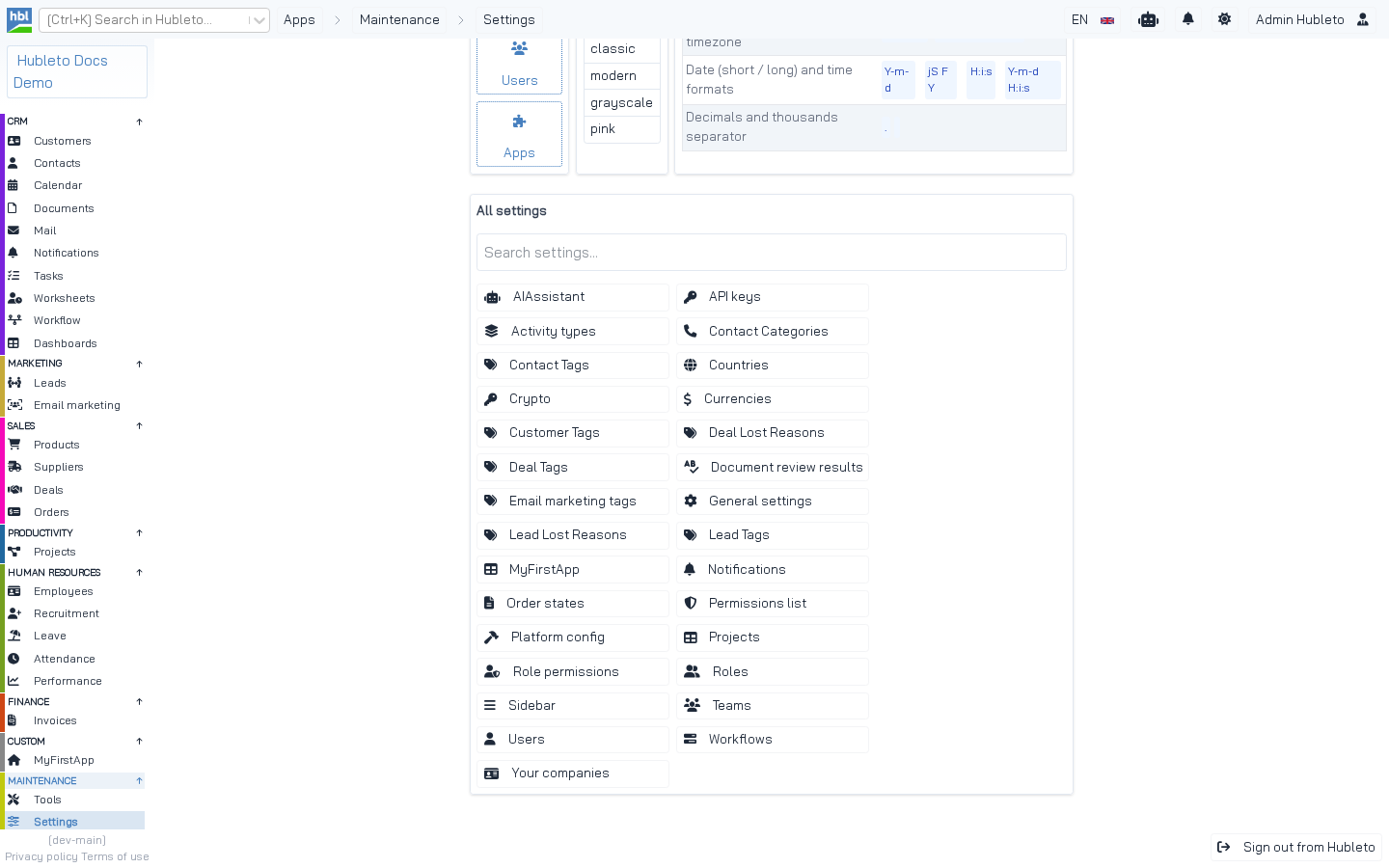 The "All settings" card. Each tile was added by an app with `addSetting()`. *MyFirstApp* was added by the `Loader.php` generated with `php hubleto create app`.
Adding a setting
Get the Settings app's loader and call addSetting() in your Loader::init():
apps/Contacts/Loader.php
/** @var \Hubleto\App\Community\Settings\Loader $settingsApp */
$settingsApp = $this->appManager()->getApp(\Hubleto\App\Community\Settings\Loader::class);

$settingsApp->addSetting($this, [
  'title' => $this->translate('Contact Categories'),
  'icon' => 'fas fa-phone',
  'url' => 'contacts/categories',
]);

$settingsApp->addSetting($this, [
  'title' => $this->translate('Contact Tags'),
  'icon' => 'fas fa-tags',
  'url' => 'contacts/tags',
]);| Key | Description |
|---|---|
title |
Text of the tile. Translate it. |
icon |
FontAwesome class. |
url |
URL of the settings page. You must register a route for it. |
Keys of a setting.
addSetting() is defined in Hubleto\Framework\App. It stores the app and the setting. getSettings() returns all settings sorted by title, and the Settings dashboard renders them as buttons:
From apps/Settings/Views/Dashboard.twig
<div id="setting-buttons" class="mt-4 flex flex-wrap gap-2">
  {% for setting in viewParams.settings %}
    <a class="btn btn-transparent w-60" href="{{ setting.url }}">
      <span class="icon"><i class="{{ setting.icon }}"></i></span>
      <span class="text">{{ setting.title }}</span>
    </a>
  {% endfor %}
</div>
The settings page itself
The tile only links to a page. You provide the page as a normal route, controller and view.
Settings as a table of records
Most settings in the community apps are lists of records (tags, categories, lost reasons). The page is a normal table:
apps/Deals/Loader.php
$this->router()->get([
  '/^deals\/tags\/?$/' => Controllers\Tags::class,
  '/^deals\/lost-reasons\/?$/' => Controllers\LostReasons::class,
]);

$settingsApp->addSetting($this, [
  'title' => $this->translate('Deal Tags'),
  'icon' => 'fas fa-tags',
  'url' => 'deals/tags',
]);
$settingsApp->addSetting($this, [
  'title' => $this->translate('Deal Lost Reasons'),
  'icon' => 'fas fa-tags',
  'url' => 'deals/lost-reasons',
]);
Settings as a form with configuration values
For configuration values, write a controller that reads posted values and stores them with the app's config methods:
apps/Deals/Controllers/Settings.php (part)
public function prepareView(): void
{
  parent::prepareView();

  /** @var \Hubleto\App\Community\Deals\Loader $dealsApp */
  $dealsApp = $this->appManager()->getApp(\Hubleto\App\Community\Deals\Loader::class);

  $settingsChanged = $this->router()->urlParamAsBool('settingsChanged');
  if ($settingsChanged) {
    $calendarColor = $this->router()->urlParamAsString('calendarColor');
    $dealsApp->setConfigAsString('calendarColor', $calendarColor);
    $dealsApp->saveConfig('calendarColor', $calendarColor);

    $dealPrefix = $this->router()->urlParamAsString('dealPrefix');
    $dealsApp->setConfigAsString('dealPrefix', $dealPrefix);
    $dealsApp->saveConfig('dealPrefix', $dealPrefix);

    $this->viewParams['settingsSaved'] = true;
  }

  $this->setView('@Hubleto:App:Community:Deals/Settings.twig');
}| Method | Description |
|---|---|
saveConfig($path, $value) |
Saves the value to the database (for all users). |
saveConfigForUser($path, $value) |
Saves the value for the current user. |
setConfigAsString($path, $value), ... |
Changes the value for the current request. |
configAsString($path, $default), configAsInteger(), configAsBool(), configAsFloat() |
Reads the value. |
Config methods of the app loader.
The path is relative to the app. saveConfig('calendarColor', ...) stores the value under apps/<app>/calendarColor. The Calendar manager reads exactly this value:
$calendar->setColor($app->configAsString('calendarColor', $calendarConfig['color'] ?? '#000000'));Settings generated by the CLI
php hubleto create app generates a settings controller and view under settings/<slug> and registers the tile:
src/apps/MyFirstApp/Loader.php (generated)
$this->router()->get([
  '/^myfirstapp\/?$/' => Controllers\Home::class,
  '/^settings\/myfirstapp\/?$/' => Controllers\Settings::class,
]);

// Add placeholder for custom settings.
// This will be displayed in the Settings app, under the "All settings" card.
$settingsApp = $this->appManager()->getApp(\Hubleto\App\Community\Settings\Loader::class);
$settingsApp->addSetting($this, [
  'title' => 'MyFirstApp', // or $this->translate('MyFirstApp')
  'icon' => 'fas fa-table',
  'url' => 'settings/myfirstapp',
]);
More examples
| App | Setting | URL |
|---|---|---|
| Leads | Lead Tags, Lead Lost Reasons | leads/tags, leads/lost-reasons |
| Orders | Order states | orders/states |
| Workflow | Workflows | workflow/workflows |
| Notifications | Notifications | notifications/settings |
| Customers | Customer Tags | customers/tags |
| Projects | Projects | settings/projects |
addSetting() in the community apps.