
Rendering second sidebar using Loader::renderSecondSidebar()
The second sidebar is the app's own sub-menu. It is shown next to the main sidebar while the user works in the app. Apps use it for secondary pages (items, milestones, lost reasons, plans) and for a link to the app's calendar.
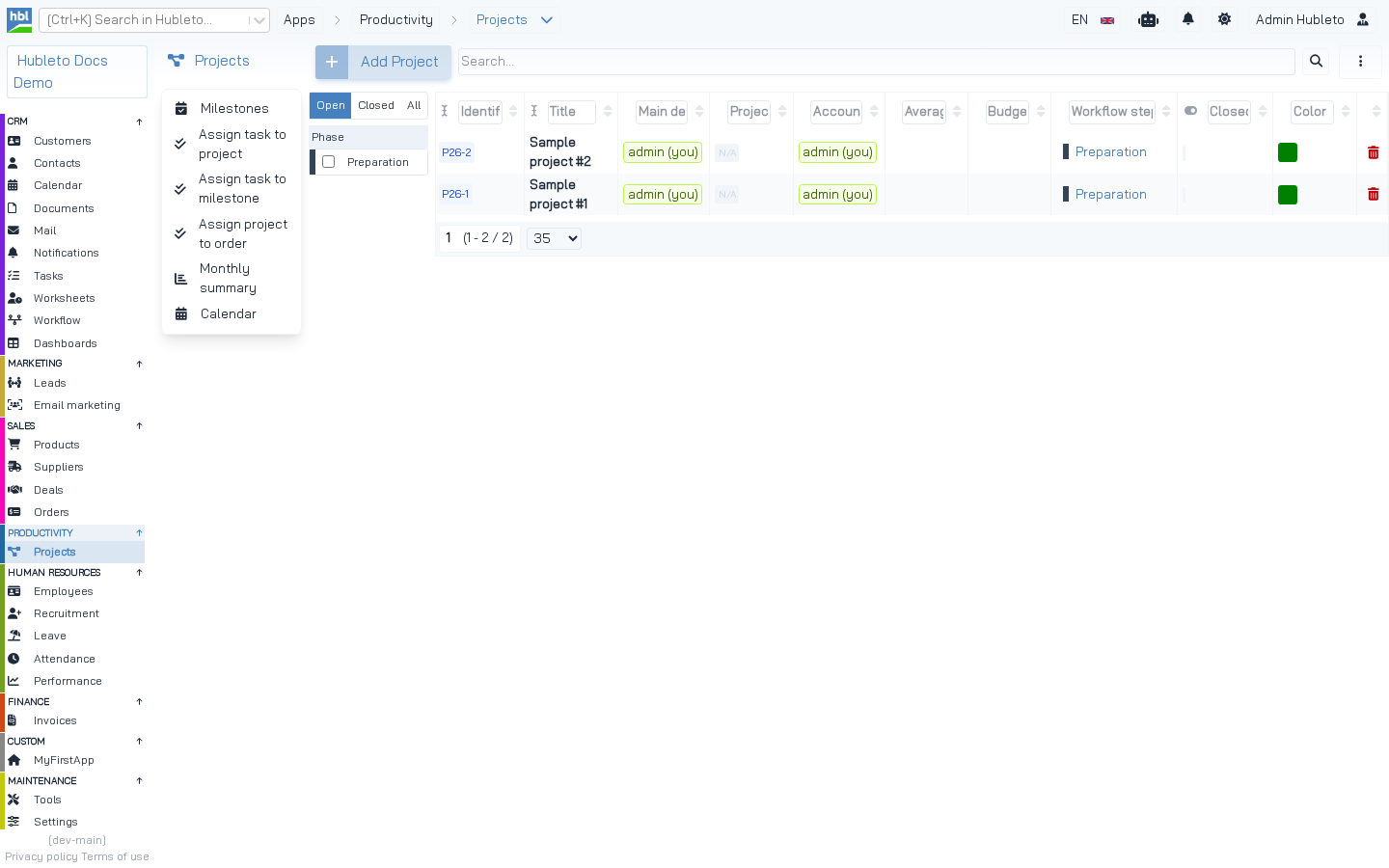 The second sidebar of the Projects app: Milestones, Assign task to project, Assign task to milestone, Assign project to order, Monthly summary and Calendar.
How it works
Override renderSecondSidebar() in your loader and return HTML. The Desktop controller calls it only for the activated app, i.e. the app whose rootUrlSlug the current URL starts with:
From apps/Desktop/Controllers/Desktop.php
$this->viewParams['secondSidebar'] = $activatedApp ? $activatedApp->renderSecondSidebar() : '';From apps/Desktop/Views/Desktop.twig
{% if viewParams.secondSidebar != '' %}
  <div class="second-sidebar">
    {{ viewParams.secondSidebar|raw }}
  </div>
{% endif %}
If the method returns an empty string (the default), no second sidebar is shown and the content gets the full width.
Helper methods
Hubleto\Erp\App provides two helpers that produce consistent HTML:
From Hubleto\Erp\App
function secondSidebarTitle(): string
{
  return '
    <div class="app-main-title"><a href="' . $this->env()->projectUrl . '/' . $this->manifest['rootUrlSlug'] . '">
      <i class="mr-2 ' . $this->manifest['icon'] . '"></i>
      ' . $this->translate($this->manifest['name']) . '
    </a></div>
  ';
}

function secondSidebarButton(string $url, string $icon, string $title, int $badge = 0): string
{
  return '<a
    class="btn ' . ($url == $this->env()->requestedUri ? "btn-primary" : "btn-transparent") . '"
    href="' . $this->env()->projectUrl . '/' .  $url . '">
      <span class="icon"><i class="' . $icon . '"></i></span>
      <span class="text">' . $this->translate($title) . '</span>
      ' . ($badge > 0 ? '<span class="badge badge-danger ml-auto">' . $badge . '</span>' : '') . '
    </a>
  ';
}| Helper | Output |
|---|---|
secondSidebarTitle() |
The app icon and translated name, linked to the app's root URL. |
secondSidebarButton($url, $icon, $title, $badge = 0) |
A button. It is highlighted when $url is the current URL. $title is translated. A red badge is shown when $badge > 0. |
Second sidebar helpers.
NOTE
secondSidebarButton()translates$titleitself. Pass the English text, not$this->translate(...).
Examples
Static list of buttons
apps/Projects/Loader.php
public function renderSecondSidebar(): string
{
  return '
    ' . $this->secondSidebarTitle() . '
    <div class="app-sidebar-buttons">
      ' . $this->secondSidebarButton('projects/milestones', 'fas fa-calendar-check', 'Milestones') . '
      ' . $this->secondSidebarButton('projects/tasks', 'fas fa-check-double', 'Assign task to project') . '
      ' . $this->secondSidebarButton('projects/tasks/milestones', 'fas fa-check-double', 'Assign task to milestone') . '
      ' . $this->secondSidebarButton('projects/orders', 'fas fa-check-double', 'Assign project to order') . '
      ' . $this->secondSidebarButton('projects/monthly-summary', 'fas fa-chart-bar', 'Monthly summary') . '
      ' . $this->secondSidebarButton('calendar?show=projects', 'fas fa-calendar-days', 'Calendar') . '
    </div>
  ';
}
Buttons with badges
The number next to a button comes from the app's Counter class, the same class used for the sidebar badge:
apps/Orders/Loader.php
public function renderSecondSidebar(): string
{
  /** @var Counter $counter */
  $counter = $this->getService(Counter::class);

  $dueAndChargeableItemsCount = $counter->dueAndChargeableItemsNotPreparedForInvoice();

  return '
    ' . $this->secondSidebarTitle() . '
    <div class="app-sidebar-buttons">
      ' . $this->secondSidebarButton('orders/items', 'fas fa-list', 'Items', $dueAndChargeableItemsCount) . '
      ' . $this->secondSidebarButton('orders/quotes', 'fas fa-receipt', 'Quotes') . '
      ' . $this->secondSidebarButton('calendar?show=orders', 'fas fa-calendar-days', 'Calendar') . '
    </div>
  ';
}
apps/Tasks/Loader.php
public function renderSecondSidebar(): string
{
  $counter = $this->getService(Counter::class);
  $myDueTodo = $counter->myDueTodo();

  return '
    ' . $this->secondSidebarTitle() . '
    <div class="app-sidebar-buttons">
      ' . $this->secondSidebarButton('tasks/todo', 'fas fa-receipt', 'Todo', $myDueTodo) . '
      ' . $this->secondSidebarButton('calendar?show=tasks', 'fas fa-calendar-days', 'Calendar') . '
    </div>
  ';
}
Buttons built from data
The Workflow app lists the workflows that are shown on the kanban board:
apps/Workflow/Loader.php (simplified)
public function renderSecondSidebar(): string
{
  $mWorkflow = $this->getModel(Models\Workflow::class);

  $workflowButtonsHtml = '<div class="list dense border-none">';
  foreach ($mWorkflow->record->where('show_in_kanban', true)->orderBy('order')->get() as $workflow) {
    $isActive = $workflow->id == $this->router()->urlParamAsInteger('idWorkflow');
    $workflowButtonsHtml .= '
      <a class="btn btn-list-item ' . ($isActive ? "btn-active" : "btn-transparent") . '"
        href="' . $this->env()->projectUrl . '/workflow/' . $workflow->id . '">
        <span class="text">' . $workflow->name . '</span>
      </a>
    ';
  }
  $workflowButtonsHtml .= '</div>';

  return '
    ' . $this->secondSidebarTitle() . '
    <div class="app-sidebar-buttons">
      ' . $workflowButtonsHtml . '
      <br/>
      ' . $this->secondSidebarButton('workflow/workflows', 'fas fa-timeline', 'Workflows') . '
      ' . $this->secondSidebarButton('workflow/steps', 'fas fa-circle-dot', 'Steps') . '
      ' . $this->secondSidebarButton('workflow/automats', 'fas fa-robot', 'Automats') . '
    </div>
  ';
}
TIP Escape user data (names, titles) with
htmlspecialchars()when you build HTML in PHP.
Rendering the sidebar with Twig
For a larger sidebar, render a Twig view of your app instead of concatenating strings:
public function renderSecondSidebar(): string
{
  return $this->renderer()->renderView('@Hubleto:App:Custom:MyFirstApp/SecondSidebar.twig', [
    'titleHtml' => $this->secondSidebarTitle(),
    'books' => $this->getModel(Models\Book::class)->record->limit(10)->get()->toArray(),
  ]);
}
Second sidebar and the app menu
There is a second mechanism for app navigation: the app menu, filled by Extendibles/AppMenu.php or by AppMenuManager::addItem() (used by Leads and Worksheets). Many apps use the second sidebar, some use the app menu. Choose one per app to keep the navigation consistent.
Tips
- Start with
secondSidebarTitle(), then a<div class="app-sidebar-buttons">with the buttons. - Link the app's calendar with
calendar?show=<source>. - Keep counts cheap. The sidebar is rendered on every page of the app.