
Integration with Dashboards app using $dashboardsApp->addBoard()
The Dashboards app lets users build their own dashboards from panels. Each panel shows one board: a small HTML view provided by an app, for example Most valuable deals, Deal warnings, Reminders, My recent tasks or Daily chart.
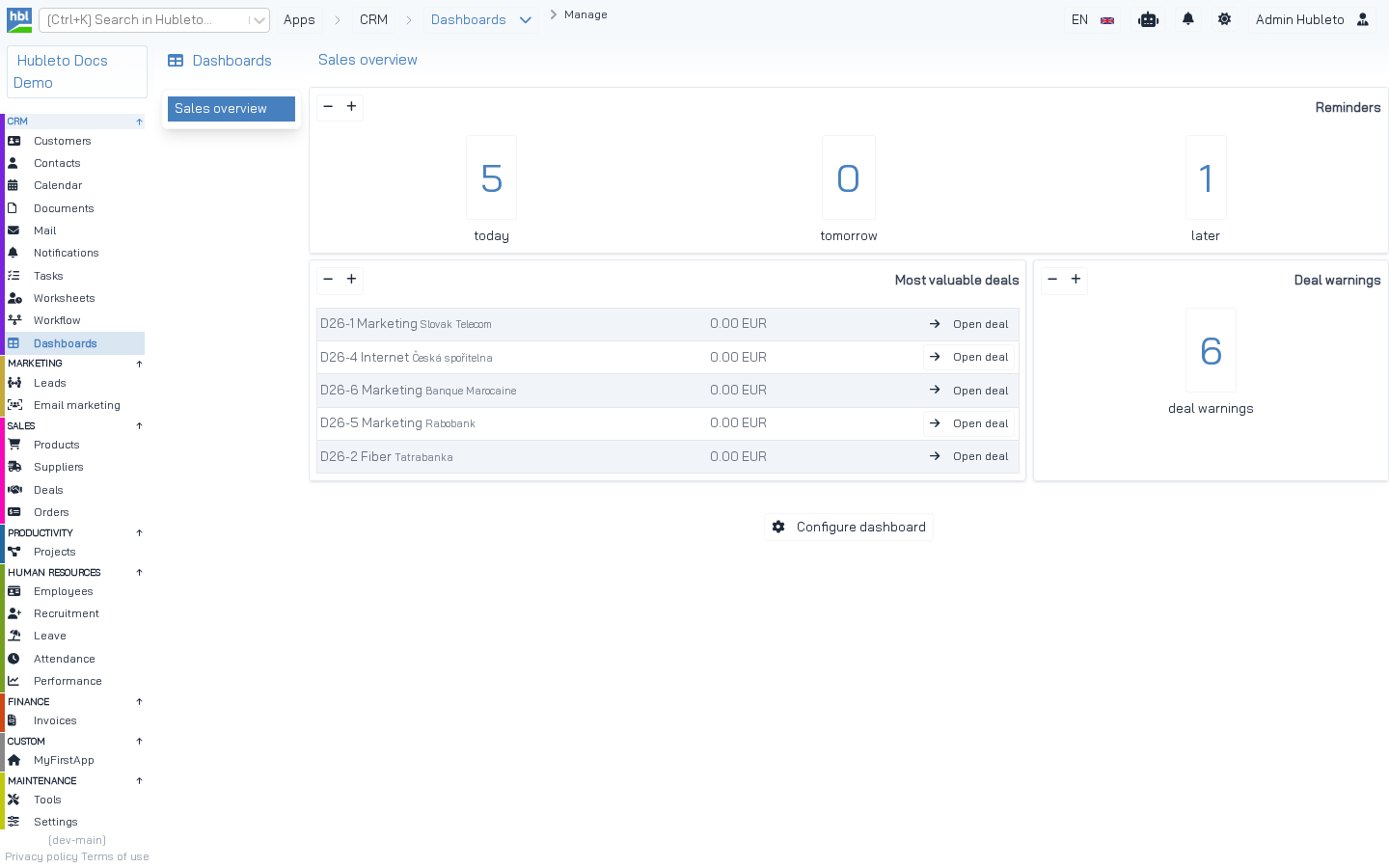 A dashboard with three panels: *Reminders* (Calendar app), *Most valuable deals* and *Deal warnings* (Deals app).
To provide a board:
- Create a controller that renders the board without the desktop.
- Create its Twig view.
- Register a route.
- Register the board with
addBoard().
NOTE In the code, boards are registered in the Dashboards manager service (
Hubleto\App\Community\Dashboards\Manager), not in the Dashboards app loader. The community apps keep the variable name$dashboardsAppor$dashboardManagerfor it.
1. Board controller
apps/Deals/Controllers/Boards/MostValuableDeals.php
<?php

namespace Hubleto\App\Community\Deals\Controllers\Boards;

use Hubleto\App\Community\Deals\Models\Deal;

class MostValuableDeals extends \Hubleto\Erp\Controller
{
  // Return only the HTML of the board, without the sidebar and the top bar
  public bool $hideDefaultDesktop = true;

  public function prepareView(): void
  {
    parent::prepareView();

    /** @var Deal $mDeal */
    $mDeal = $this->getModel(Deal::class);

    $mostValuableDeals = $mDeal->record->prepareReadQuery()
      ->with('CURRENCY')
      ->orderBy("price", "desc")
      ->offset(0)
      ->limit(5)
      ->get()
      ->toArray();

    $this->viewParams['mostValuableDeals'] = $mostValuableDeals;

    $this->setView('@Hubleto:App:Community:Deals/Boards/MostValuableDeals.twig');
  }
}
Rules for board controllers:
- put them into
Controllers/Boards/, - set
$hideDefaultDesktop = true, - keep the query small (a board is one of several on the page),
- use
prepareReadQuery(), so the user sees only records they may see.
2. Board view
apps/Deals/Views/Boards/MostValuableDeals.twig
{% if viewParams.mostValuableDeals|length > 0 %}
  <table class="table-default dense w-full">
    {% for deal in viewParams.mostValuableDeals %}
      <tr>
        <td>
          {{ deal.identifier }}
          {{ deal.title }}
          <small>{{ deal.CUSTOMER.name }}</small>
        </td>
        <td>{{ hubleto.locale().formatCurrency(deal.price_excl_vat ?? 0, deal.CURRENCY.code ?? '') }}</td>
        <td class="text-right">
          <a href="deals/{{ deal.id }}" class="btn btn-transparent btn-small">
            <span class="icon"><i class="fas fa-arrow-right"></i></span>
            <span class="text">{{ translate('Open deal') }}</span>
          </a>
        </td>
      </tr>
    {% endfor %}
  </table>
{% else %}
  <div class="alert alert-info">
    {{ translate('No deals found.') }}<br/>
    <br/>
    <a href="deals?add" class="btn btn-transparent">
      <span class="icon"><i class="fas fa-add"></i></span>
      <span class="text">{{ translate('Add deal') }}</span>
    </a>
  </div>
{% endif %}
A board view may also contain hblreact tags, e.g. a chart component that loads its data from an API controller (see the Worksheets Daily chart board and Controllers/Api/DailyActivityChart.php).
3. Route
Boards live under <rootUrlSlug>/boards/:
apps/Deals/Loader.php
$this->router()->get([
  '/^deals\/boards\/deal-warnings\/?$/' => Controllers\Boards\DealWarnings::class,
  '/^deals\/boards\/most-valuable-deals\/?$/' => Controllers\Boards\MostValuableDeals::class,
  '/^deals\/boards\/deal-value-by-result\/?$/' => Controllers\Boards\DealValueByResult::class,
]);
4. Registration
apps/Deals/Loader.php
/** @var \Hubleto\App\Community\Dashboards\Manager $dashboardManager */
$dashboardManager = $this->getService(\Hubleto\App\Community\Dashboards\Manager::class);
$dashboardManager->addBoard($this, $this->translate('Deal warnings'), 'deals/boards/deal-warnings');
$dashboardManager->addBoard($this, $this->translate('Most valuable deals'), 'deals/boards/most-valuable-deals');
$dashboardManager->addBoard($this, $this->translate('Deal value by result'), 'deals/boards/deal-value-by-result');| Argument | Description |
|---|---|
$app |
Your app ($this). |
$title |
Name of the board shown to the user. Translate it. |
$boardUrlSlug |
URL of the board controller (the route from step 3). |
Arguments of addBoard().
Hubleto\App\Community\Dashboards\Manager
class Manager extends \Hubleto\Erp\Core
{
  protected array $boards = [];

  public function getBoards(): array
  {
    return $this->boards;
  }

  public function addBoard(\Hubleto\Framework\Interfaces\AppInterface $app, string $title, string $boardUrlSlug): void
  {
    $this->boards[$boardUrlSlug] = [
      'app' => $app,
      'title' => $title,
      'boardUrlSlug' => $boardUrlSlug,
    ];
  }
}
A defensive variant checks that the service exists:
apps/Worksheets/Loader.php
/** @var \Hubleto\App\Community\Dashboards\Manager $dashboardsApp */
$dashboardsApp = $this->getService(\Hubleto\App\Community\Dashboards\Manager::class);
if ($dashboardsApp) {
  $dashboardsApp->addBoard($this, $this->translate('Daily chart'), 'worksheets/boards/daily-chart');
  $dashboardsApp->addBoard($this, $this->translate('Monthly summary'), 'worksheets/boards/monthly-summary');
}
How a board gets on a dashboard
- The user adds a panel to a dashboard and selects a board. The list of boards comes from
Manager::getBoards()(seePanel::describeInput()in describeInput()). - The panel stores the board URL in
board_url_slugand an optional JSONconfiguration. - When the dashboard is shown,
Dashboard.tsxsends aPOSTrequest to the board URL for every panel. The panel configuration plusidPanel,panelUrlSlugandpanelUidare sent as parameters. - The returned HTML is shown in the panel.
Your board controller can read the panel configuration with the router:
$idPanel = $this->router()->urlParamAsInteger('idPanel');
$limit = $this->router()->urlParamAsInteger('limit', 5); // a key from the panel's configuration JSON
Boards in the community apps
| App | Boards |
|---|---|
| Deals | Deal warnings, Most valuable deals, Deal value by result |
| Leads | Lead value by score, Lead warnings |
| Orders | Order warnings |
| Tasks | My recent tasks |
| Calendar | Reminders |
| Worksheets | Daily chart, Monthly summary |
| Workflow | Items with not updated step |
Boards provided by the community apps.