
Using hblreact HTML tag
The hblreact tag connects Twig views with React components. You write a custom HTML tag in a Twig view. After the page loads, Hubleto finds the tag and renders the React component registered under that name.
apps/Contacts/Views/Contacts.twig
<hblreact-contacts-table-contacts
  string:tag="table-contacts"
  int:record-id="{{ viewParams.recordId }}"
  string:fulltext-search='{{ viewParams.q }}'
  json:column-search='{{ viewParams.search|json_encode }}'
  json:filters='{{ viewParams.filters|json_encode }}'
  string:form-active-tab-uid='{{ viewParams.tab }}'
></hblreact-contacts-table-contacts>
This renders the component registered as ContactsTableContacts in apps/Contacts/Loader.tsx:
globalThis.hubleto.registerReactComponent('ContactsTableContacts', TableContacts);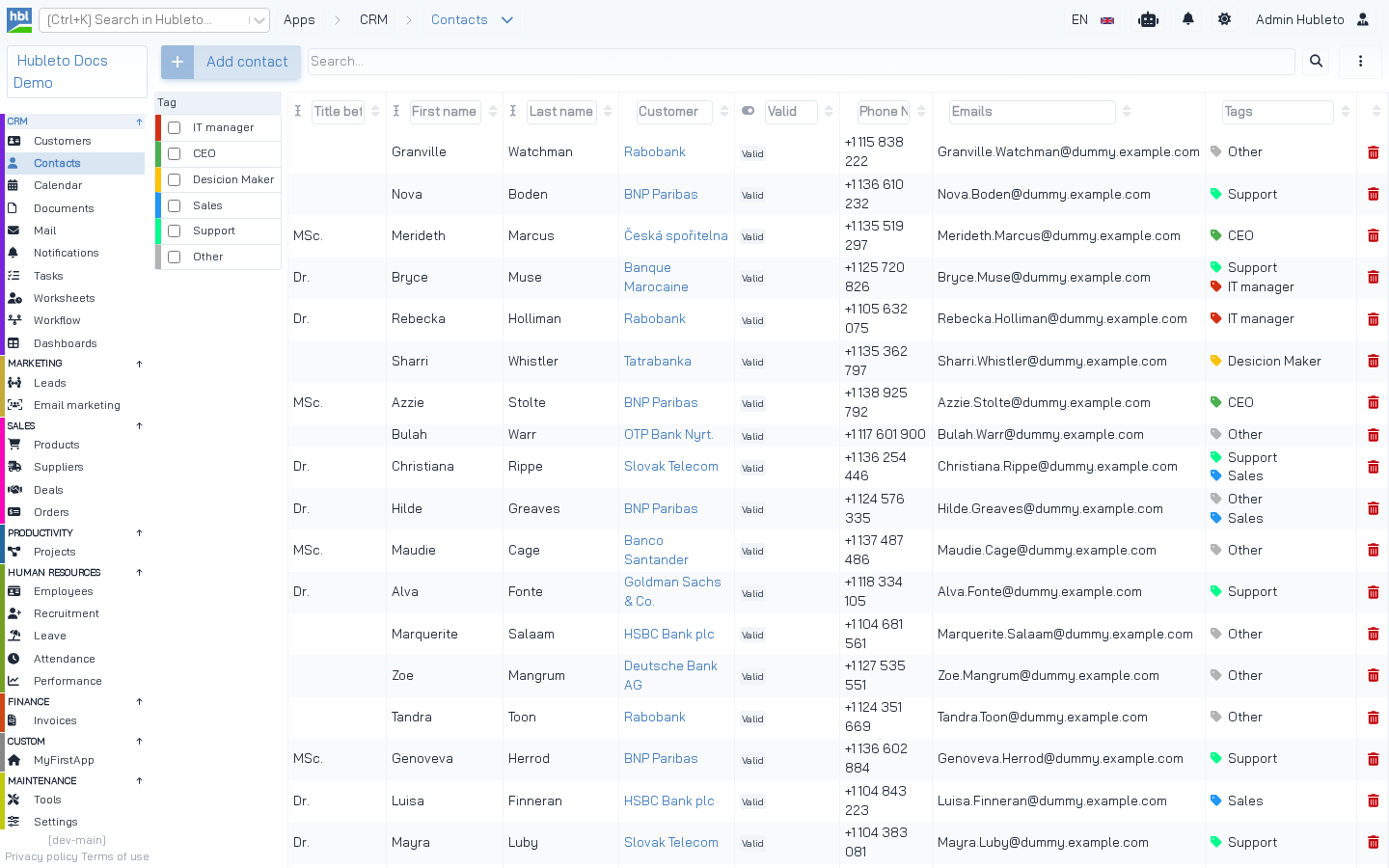 The Contacts table rendered from the tag above.
From tag name to component
| Step | Value |
|---|---|
| Tag in Twig | <hblreact-hr-leave-table-leave-requests> |
| Prefix removed | hr-leave-table-leave-requests |
Converted with kebabToPascal() |
HrLeaveTableLeaveRequests |
| Registered in Loader.tsx | registerReactComponent('HrLeaveTableLeaveRequests', TableLeaveRequests) |
From the tag name to the component.
Rules for the name:
- The tag name is
hblreact-+ the registered name in kebab-case. - The registered name should start with the app's short name (
Contacts,Deals,HrLeave) to avoid conflicts between apps. - If the component is not registered, the browser console shows: Hubleto: renderReactElement(...). Component does not exist.
NOTE The older
<app-...>prefix still works but is deprecated. A warning is shown in the console. Use<hblreact-...>.
Passing props
Attributes of the tag become props of the component. Attribute names are converted from kebab-case to camelCase (record-id → recordId). A type prefix tells Hubleto how to convert the value:
| Prefix | Conversion | Example attribute | Prop value |
|---|---|---|---|
string: |
none | string:tag="table-contacts" |
"table-contacts" |
int: |
parseInt() |
int:record-id="5" |
5 |
bool: |
value == 'true' |
bool:show-add-new-panel-button='true' |
true |
json: |
JSON.parse() |
json:filters='{"fDealClosed":1}' |
{fDealClosed: 1} |
function: |
new Function(value) |
function:on-change="console.log('changed')" |
a function |
| no prefix | "true"/"false" → boolean, valid JSON → parsed, otherwise string |
readonly="true" |
true |
Type prefixes.
TIP Always use a prefix. Without it, a value like
"123"or"null"may be parsed as JSON and change its type.
From @hubleto/react-ui/core/Loader.tsx (convertDomToReact)
let attributeName: string = domElement.attributes[i].name.replace(/-([a-z])/g, (_: any, letter: string) => letter.toUpperCase());
let attributeValue: any = domElement.attributes[i].value;

if (attributeName.startsWith('json:')) {
  attributeName = attributeName.replace('json:', '');
  attributeValue = JSON.parse(attributeValue);
} else if (attributeName.startsWith('string:')) {
  attributeName = attributeName.replace('string:', '');
} else if (attributeName.startsWith('int:')) {
  attributeName = attributeName.replace('int:', '');
  attributeValue = parseInt(attributeValue);
} else if (attributeName.startsWith('bool:')) {
  attributeName = attributeName.replace('bool:', '');
  attributeValue = attributeValue == 'true';
}
// ...
Escaping JSON in attributes
Use single quotes around json: attributes, because JSON contains double quotes:
json:filters='{{ viewParams.filters|json_encode }}'When the JSON may contain HTML or quotes from user data, add |raw only if you are sure the value is safe, or escape it for an HTML attribute:
apps/Dashboards/Views/Dashboard.twig
{% set dashboard = viewParams.dashboard %}

<h1 class="app-main-title"><span>{{ dashboard.title }}</span></h1>

<hblreact-dashboards-dashboard
  int:id-dashboard='{{ dashboard.id }}'
  bool:show-add-new-panel-button='true'
  json:panels='{{ dashboard.PANELS|json_encode|raw }}'
></hblreact-dashboards-dashboard>
Standard props for tables
Table views in the community apps pass the same set of props. They keep the table state in the URL:
| Attribute | URL example | Purpose |
|---|---|---|
string:tag="table-deals" |
— | Unique tag, enables user column configuration. |
int:record-id="{{ viewParams.recordId }}" |
deals/5, deals/add |
Opens a record (-1 = new record). |
string:fulltext-search='{{ viewParams.q }}' |
deals?q=fiber |
Text in the search box. |
json:column-search='{{ viewParams.search\|json_encode }}' |
deals?search[title]=x |
Search in columns. |
json:filters='{{ viewParams.filters\|json_encode }}' |
deals?filters[fDealClosed]=1 |
Selected filters. |
string:form-active-tab-uid='{{ viewParams.tab }}' |
deals/5?tab=items |
Active tab of the opened form. |
string:view="{{ viewParams.view }}" |
— | Alternative view of the table. |
Standard props for table tags.
Nested content
Child nodes of the tag are converted too and passed as children. Normal HTML elements inside the tag become React elements. Nested hblreact-* tags become components.
<hblreact-my-app-panel string:title="{{ translate('Summary') }}">
  <p>{{ translate('This paragraph is passed as children.') }}</p>
</hblreact-my-app-panel>
When the tags are rendered
globalThis.hubleto.renderReactElements() runs after the page loads. It finds all hblreact-* elements that are not rendered yet and mounts a React root in each. A tag rendered once gets the hubleto-react-rendered attribute, so it is not rendered twice. If you insert HTML with hblreact tags later (e.g. after an AJAX call), call globalThis.hubleto.renderReactElements(containerElement).
Every rendered component gets a uid prop (generated if you don't pass one). The component object is available as globalThis.hubleto.reactElements[uid].
Complete example
1. Component: src/apps/MyFirstApp/Components/Greeting.tsx
import React from 'react';

interface GreetingProps {
  name: string,
  unreadMessages: number,
}

const Greeting = (props: GreetingProps) => {
  return <div className="card">
    <div className="card-body">
      Hello {props.name}, you have {props.unreadMessages} unread messages.
    </div>
  </div>;
}

export default Greeting;
2. Registration: src/apps/MyFirstApp/Loader.tsx
import Greeting from './Components/Greeting';

globalThis.hubleto.registerReactComponent('MyFirstAppGreeting', Greeting);
3. Controller: src/apps/MyFirstApp/Controllers/Home.php
public function prepareView(): void
{
  parent::prepareView();
  $this->viewParams['userName'] = $this->authProvider()->getUser()['first_name'] ?? '';
  $this->viewParams['unreadMessages'] = 3;
  $this->setView('@Hubleto:App:Custom:MyFirstApp/Home.twig');
}
4. View: src/apps/MyFirstApp/Views/Home.twig
<hblreact-my-first-app-greeting
  string:name="{{ viewParams.userName }}"
  int:unread-messages="{{ viewParams.unreadMessages }}"
></hblreact-my-first-app-greeting>
5. Build
npm run build