
Model's describeTable() method
Purpose
describeTable() describes how a table of the model's records looks and behaves: its title, buttons, search, filters, visible columns and permissions. It returns a Hubleto\Framework\Description\Table object.
It is called by the generic endpoint api/table-describe-and-load every time a Table.tsx component loads or reloads (for example when the user changes a filter). So the description can depend on the current request: URL parameters, selected filters, the signed-in user.
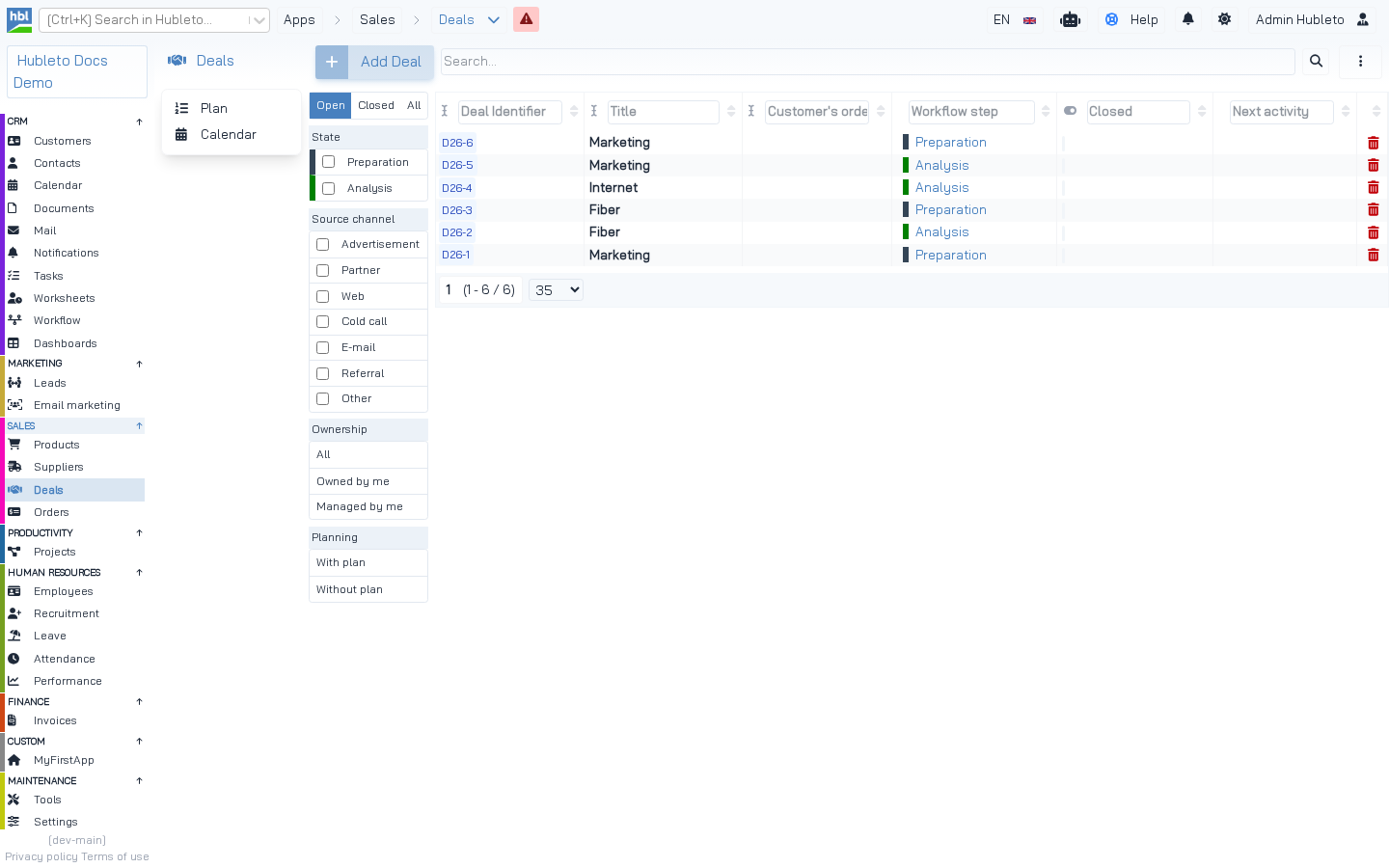 The Deals table. The Open/Closed/All switch, the State, Source channel, Ownership and Planning filters, the search box and the "Add Deal" button all come from `Deal::describeTable()`.
Default implementation
Hubleto\Framework\Model::describeTable() does this for you:
- adds all columns except
idand columns marked withsetHidden()to$description->columns, - adds the input description of every column to
$description->inputs(used for inline editing and the column search), - sets all permissions to
true, - adds the Export to CSV and Import from CSV actions to the "more actions" menu,
- if the table has a
tag: adds the Columns action and applies column visibility (default visible columns, or the user's saved configuration).
The Table description object
$description->ui
| Key | Type | Default | Description |
|---|---|---|---|
title |
string | '' |
Title above the table. |
subTitle |
string | '' |
Subtitle. |
addButtonText |
string | '' |
Text of the button that adds a record. |
showHeader |
bool | true |
Header with title, buttons and search. |
showFooter |
bool | true |
Footer with paging. |
showFilter |
bool | true |
Filter area. |
showSidebarFilter |
bool | true |
Filters in the left sidebar of the table. |
showHeaderTitle |
bool | true |
Title in the header. |
showFulltextSearch |
bool | false |
Search box. |
showColumnSearch |
bool | false |
Search inputs above the columns. |
showMoreActionsButton |
bool | false |
The "⋮" button with more actions (CSV, columns). |
showAddButton |
bool | true |
The add button. |
showInsertRow |
bool | false |
An empty row for quick inline insert. |
filters |
array | — | Filters, see below. Use addFilter(). |
moreActions |
array | CSV export/import | Items of the "more actions" menu. |
orderBy |
array | id desc |
Default sorting. Use setOrderBy(). |
emptyMessage |
string | — | Message when there are no records. |
UI settings of a table.
Methods
| Method | Description |
|---|---|
show(array $what) / hide(array $what) |
Shortcut for the show* flags: show(['header', 'fulltextSearch']) sets showHeader and showFulltextSearch to true. |
addFilter(string $name, array $config) |
Adds a filter. |
setOrderBy(string $field, string $direction) |
Default sorting. |
showOnlyColumns(array $columnNames) |
Keeps only the listed columns, in that order. |
hideColumns(array $columnNames) |
Removes the listed columns. |
addColumn(string $name, $column) |
Adds a column that is not in the model (e.g. an aggregate). |
setPermissions($canCreate, $canRead, $canUpdate, $canDelete) |
Sets permissions (null = keep). |
Methods of the Table description.
$description->columns, $description->inputs, $description->permissions
columns is an array name => Column object. inputs is an array name => Input description. permissions is ['canCreate' => bool, 'canRead' => bool, 'canUpdate' => bool, 'canDelete' => bool].
Filters
A filter is shown as a group of buttons. When the user clicks a button, the table sends filters[<name>]=<value> to the backend and reloads. The filter has no effect until you implement it in the record manager (addUrlFiltersToQuery()).
| Filter key | Description |
|---|---|
title |
Title of the filter group. |
options |
value => label. |
type |
multipleSelectButtons allows selecting more values (the value is then an array). |
default |
Value selected by default. |
direction |
horizontal shows the buttons in one row above the table. |
colors |
value => color (e.g. colors of tags or workflow steps). |
Filter configuration.
Example: filters of the Deals table
apps/Deals/Models/Deal.php
public function describeTable(): \Hubleto\Framework\Description\Table
{
  $description = parent::describeTable();
  $description->ui['addButtonText'] = $this->translate('Add Deal');
  $description->show(['header', 'fulltextSearch', 'columnSearch', 'moreActionsButton']);
  $description->hide(['footer']);

  $description->ui['filters'] = [
    'fDealClosed' => [
      'direction' => 'horizontal',
      'options' => [
        1 => $this->translate('Open'),
        2 => $this->translate('Closed'),
        3 => $this->translate('All'),
      ],
      'default' => 1,
    ],
    'fDealWorkflowStep' => Workflow::buildTableFilterForWorkflowSteps($this, 'State'),
    'fDealSourceChannel' => [
      'title' => $this->translate('Source channel'),
      'type' => 'multipleSelectButtons',
      'options' => array_map(fn($v) => $this->translate($v), self::ENUM_SOURCE_CHANNELS),
    ],
    'fDealOwnership' => [
      'title' => $this->translate('Ownership'),
      'options' => [ 0 => $this->translate('All'), 1 => $this->translate('Owned by me'), 2 => $this->translate('Managed by me') ],
    ],
  ];

  $description->addFilter('fDealWithPlan', [
    'title' => $this->translate('Planning'),
    'options' => [
      1 => $this->translate('With plan'),
      2 => $this->translate('Without plan'),
    ],
  ]);

  return $description;
}
apps/Deals/Models/RecordManagers/Deal.php: implementation of the filters (part)
public function addUrlFiltersToQuery(mixed $query): mixed
{
  $query = parent::addUrlFiltersToQuery($query);

  $hubleto = \Hubleto\Erp\Loader::getGlobalApp();
  $filters = $hubleto->router()->urlParamAsArray("filters");

  if (isset($filters["fDealOwnership"])) {
    switch ($filters["fDealOwnership"]) {
      case 1: $query = $query->where("deals.id_owner", $hubleto->authProvider()->getUserId()); break;
      case 2: $query = $query->where("deals.id_manager", $hubleto->authProvider()->getUserId()); break;
    }
  }

  // Same default as in describeTable(): show open deals
  $fDealClosed = $filters['fDealClosed'] ?? 1;
  if ($fDealClosed == 1) $query = $query->where("deals.is_closed", false);
  if ($fDealClosed == 2) $query = $query->where("deals.is_closed", true);

  return $query;
}
Example: filter options loaded from the database
apps/Contacts/Models/Contact.php
public function describeTable(): \Hubleto\Framework\Description\Table
{
  $description = parent::describeTable();
  $description->ui['addButtonText'] = $this->translate('Add contact');
  $description->show(['header', 'fulltextSearch', 'columnSearch', 'moreActionsButton']);
  $description->hide(['footer']);

  $tagColors = [];
  $tagOptions = [];
  foreach ($this->getModel(Tag::class)->record->get() as $tag) {
    $tagColors[$tag->id] = $tag->color;
    $tagOptions[$tag->id] = $tag->name;
  }

  $description->addFilter('fTag', [
    'title' => $this->translate('Tag'),
    'type' => 'multipleSelectButtons',
    'colors' => $tagColors,
    'options' => $tagOptions,
  ]);

  return $description;
}
Example: workflow step filter
The Workflow app provides a helper that builds a filter with the steps of all workflows used by the model, including their colors:
apps/HrLeave/Models/LeaveRequest.php
$description->addFilter(
  'fLeaveWorkflowStep',
  WorkflowModel::buildTableFilterForWorkflowSteps($this, $this->translate('Approval step'))
);
Columns that depend on the request
Hide a column depending on a filter
apps/Invoices/Models/Invoice.php (part)
$filters = $this->router()->urlParamAsArray("filters");

$description = parent::describeTable();

switch ($filters['fInboundOutbound'] ?? 0) {
  case self::INBOUND_INVOICE: $description->hideColumns(['id_customer']); break;
  case self::OUTBOUND_INVOICE: $description->hideColumns(['id_supplier']); break;
}
Grouped view with aggregate columns
apps/Invoices/Models/Item.php (part)
if (isset($filters['fGroupBy'])) {
  $fGroupBy = (array) $filters['fGroupBy'];

  $showOnlyColumns = [];
  if (in_array('customer', $fGroupBy)) $showOnlyColumns[] = 'id_customer';
  if (in_array('order', $fGroupBy)) $showOnlyColumns[] = 'id_order';
  $description->showOnlyColumns($showOnlyColumns);

  $description->addColumn(
    'total_price_excl_vat',
    (new Decimal($this, $this->translate('Total price excl. VAT')))->setDecimals(2)->setCssClass('badge badge-warning')
  );
}
A minimal table inside a parent form
When the table is shown in a tab of another form (the URL contains the parent ID), a compact description is often enough:
apps/Leads/Models/LeadDocument.php
public function describeTable(): \Hubleto\Framework\Description\Table
{
  $description = parent::describeTable();

  if ($this->router()->urlParamAsInteger('idLead') > 0) {
    $description->columns = [];
    $description->inputs = [];
    $description->ui = [];
  }

  return $description;
}
Overriding the description from React
The React component can override parts of the description with the description prop. descriptionSource='both' (the default) merges the backend description with the prop:
apps/Projects/Loader.tsx (part)
<TableProjects
  parentForm={form}
  description={{ui: {showHeader: false}}}
  descriptionSource='both'
  ...
/>
descriptionSource |
Result |
|---|---|
'both' |
backend description merged with the description prop |
'request' |
backend description only |
'props' |
description prop only (the backend description is ignored) |
Description sources.
Tips
- Call
parent::describeTable()first and modify its result. - Translate
title,addButtonText, filter titles and options. - Use
show()andhide()instead of settingui['show...']keys one by one. - Use the same filter default in
describeTable()and inaddUrlFiltersToQuery(). - Prefix filter names with
fand the entity:fDealClosed,fLeaveWorkflowStep.