
Model's describeForm() method
Purpose
describeForm() describes the form for one record of the model: the inputs, their default values, which relations are loaded with the record, the buttons and the permissions. It returns a Hubleto\Framework\Description\Form object.
It is called by the generic endpoint api/form-describe-and-load every time a Form.tsx component opens a record or creates a new one.
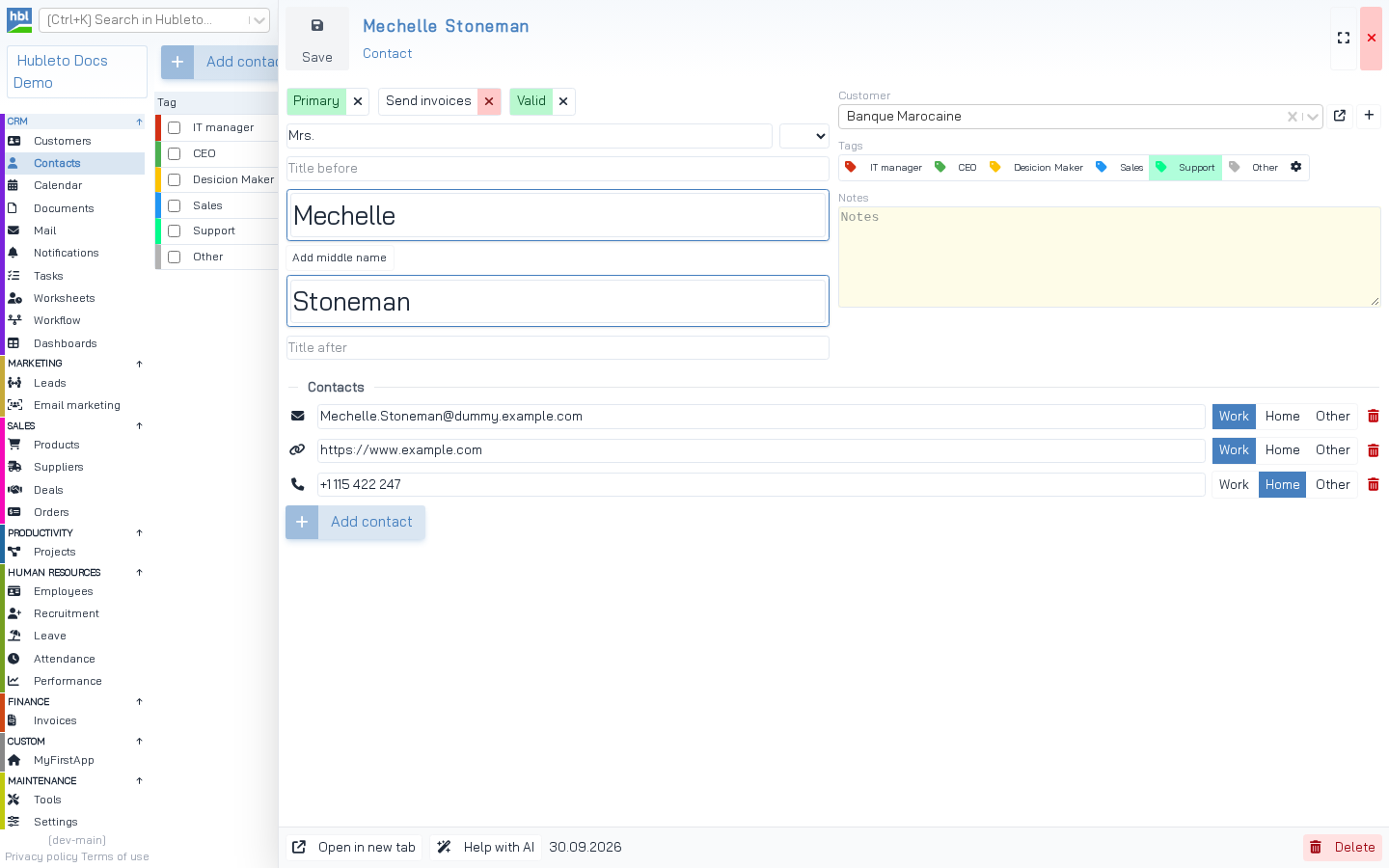 The contact form. The inputs, their labels, the predefined salutations and the default values of the toggles come from `Contact::describeForm()`. The layout comes from `FormContact.tsx`.
Default implementation
Hubleto\Framework\Model::describeForm():
- adds
describeInput($column)of every column exceptidto$description->inputs, - copies the default value of every column (
setDefaultValue()) into$description->defaultValues, - sets
$description->includeRelationsto the names of all relations in$relations, - sets all permissions to
true.
From Hubleto\Framework\Model::describeForm()
public function describeForm(): \Hubleto\Framework\Description\Form
{
  $description = new \Hubleto\Framework\Description\Form();

  $description->inputs = [];
  foreach ($this->columnNames() as $columnName) {
    if ($columnName == 'id') continue;

    $inputDesc = $this->describeInput($columnName);
    $description->inputs[$columnName] = $inputDesc;

    if ($inputDesc->getDefaultValue() !== null) {
      $description->defaultValues[$columnName] = $inputDesc->getDefaultValue();
    }
  }

  $description->includeRelations = array_keys($this->relations);

  $description->permissions = [
    'canRead' => true,
    'canCreate' => true,
    'canUpdate' => true,
    'canDelete' => true,
  ];

  return $description;
}
The Form description object
| Property | Type | Description |
|---|---|---|
ui |
array | UI settings, see below. |
inputs |
array of Input |
Input description per column. Modify with $description->inputs['col']->set...(). |
defaultValues |
array | Values of a new record. Use setDefaultValue($column, $value). |
includeRelations |
array of strings | Relations loaded together with the record (CUSTOMER, ITEMS, ...). |
permissions |
array | canCreate, canRead, canUpdate, canDelete. |
Properties of the Form description.
ui key |
Default | Description |
|---|---|---|
title, subTitle |
'' |
Title of the form. |
showSaveButton |
true |
Save button. |
showCopyButton |
false |
Copy button. |
showDeleteButton |
true |
Delete button. |
saveButtonText |
'' |
Text of the save button (existing record). |
addButtonText |
'' |
Text of the save button (new record). |
copyButtonText, deleteButtonText |
'' |
Texts of the other buttons. |
headerClassName |
'' |
CSS class of the form header. |
UI settings of a form.
Methods: show(array), hide(array) (e.g. hide(['deleteButton'])) and setDefaultValue(string $column, mixed $value).
Examples
Default value computed from the database
The currency of a new deal is the default currency from the settings:
apps/Deals/Models/Deal.php
public function describeForm(): \Hubleto\Framework\Description\Form
{
  /** @var Setting $mSettings */
  $mSettings = $this->getModel(Setting::class);

  $defaultCurrency = (int) $mSettings->record
    ->where("key", "Apps\Community\Settings\Currency\DefaultCurrency")
    ->first()
    ->value;

  $description = parent::describeForm();
  $description->defaultValues['id_currency'] = $defaultCurrency;

  return $description;
}
TIP Put values that need a database query into
describeForm(), not intosetDefaultValue()indescribeColumns().describeColumns()runs for every model instance,describeForm()only when a form is opened.
Predefined values of an input
apps/Contacts/Models/Contact.php
public function describeForm(): \Hubleto\Framework\Description\Form
{
  $description = parent::describeForm();

  $description->inputs['salutation']->setPredefinedValues([
    $this->translate('Mr.'),
    $this->translate('Mrs.'),
  ]);

  return $description;
}
The same pattern in the HR apps:
apps/HrRecruitment/Models/Interview.php
public function describeForm(): \Hubleto\Framework\Description\Form
{
  $description = parent::describeForm();
  $description->inputs['status']->setPredefinedValues([
    $this->translate('Scheduled'),
    $this->translate('Completed'),
    $this->translate('Cancelled'),
  ]);
  return $description;
}
Restricted permissions and custom button texts
E-mails can be created (saved as drafts), but not edited or deleted:
apps/Mail/Models/Mail.php
public function describeForm(): \Hubleto\Framework\Description\Form
{
  $description = parent::describeForm();

  $description->permissions['canDelete'] = false;
  $description->permissions['canUpdate'] = false;
  $description->ui['addButtonText'] = $this->translate('Save draft');
  $description->ui['saveButtonText'] = $this->translate('Save draft');

  return $description;
}
What the form receives
A real response for a new contact (id=-1), shortened:
GET api/form-describe-and-load?model=Hubleto/App/Community/Contacts/Models/Contact&id=-1
{
  "description": {
    "ui": { "showSaveButton": true, "showDeleteButton": true },
    "inputs": {
      "salutation": { "type": "varchar", "title": "Salutation", "predefinedValues": ["Mr.", "Mrs."] },
      "first_name": { "type": "varchar", "title": "First name" },
      "id_customer": { "type": "lookup", "title": "Customer", "model": "Hubleto\\App\\Community\\Customers\\Models\\Customer", "inputProps": { "urlAdd": "customers/add" } },
      "is_primary": { "type": "boolean", "title": "Primary Contact" },
      "date_created": { "type": "date", "title": "Date Created", "readonly": true, "required": true, "defaultValue": "2026-09-30" }
    },
    "permissions": { "canCreate": true, "canRead": true, "canUpdate": true, "canDelete": true },
    "defaultValues": { "is_primary": 0, "is_for_invoicing": 0, "date_created": "2026-09-30", "is_valid": 1 },
    "includeRelations": ["CUSTOMER", "VALUES", "TAGS"]
  },
  "record": []
}
For a new record, the form uses defaultValues as the initial record. For an existing record, record contains the loaded data including the relations from includeRelations.
Permissions per record
The permissions in the description apply to the form in general. When a record is loaded, Hubleto\Erp\Model::getPermissions($record) computes permissions for that record (owner, manager, team, shared_with). They are sent as _PERMISSIONS in the record. If the user can neither create nor update, the form becomes read-only. A record with is_closed = 1 is read-only too.
Customizing the description in React
Form.tsx merges the backend description with its description prop (descriptionSource='both'). A parent table can pass default values this way. That is how formDefaultValues of a table works:
apps/Deals/Components/FC/TableDeals.tsx
<Table
  model={parentApp + '/Models/Deal'}
  formDefaultValues={{id_customer: props.idCustomer}}
  ...
/>
A deal created from the customer's form gets the customer pre-filled.